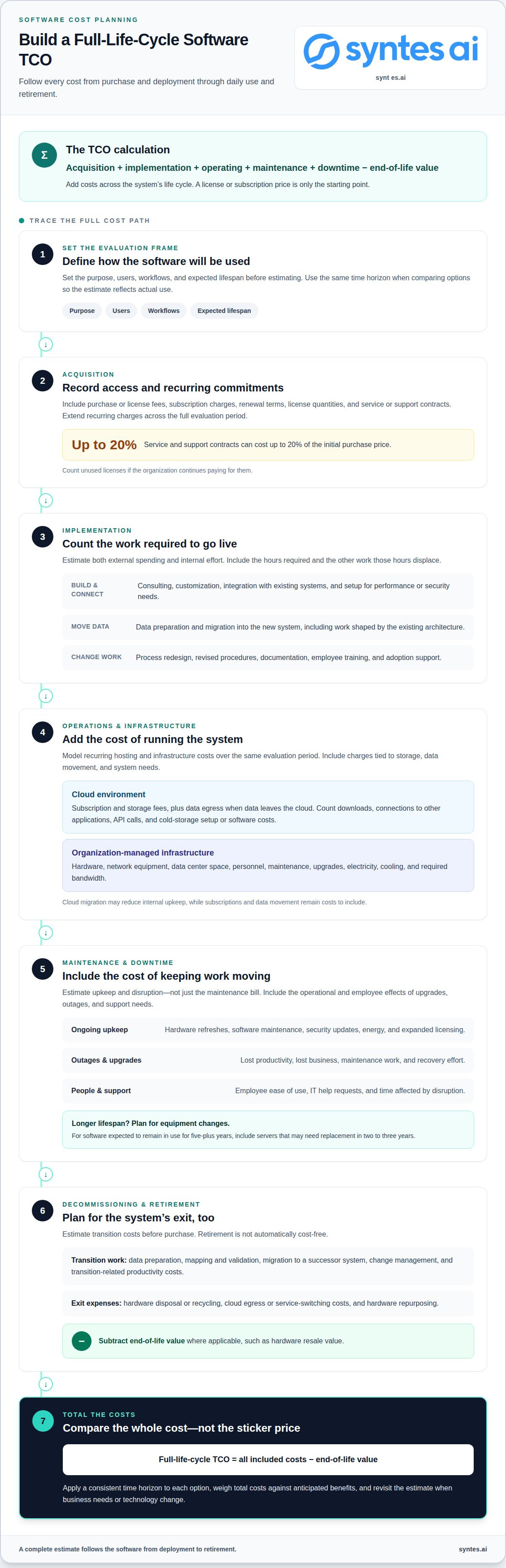
A software license price is only the starting point, not the full cost of owning a system. To calculate total cost of ownership for software, add acquisition, implementation, operating, maintenance, and downtime costs over the system’s life cycle, then subtract any end-of-life value. The relevant categories depend on the software and how your organization uses it.
It’s easy to focus on visible costs such as a purchase fee, subscription, or implementation bill. But employee time, integrations, hosting, support, outages, and eventual data migration can also affect the total. A lower upfront cost does not necessarily mean a lower cost over time.
This guide explains which costs to include in a software TCO estimate, how to account for infrastructure and hosting, and how to use the result in budgeting and purchasing decisions. It also shows why users, workflows, expected lifespan, and planned business growth matter. The goal is to compare total costs and anticipated benefits, not decide on sticker price alone.
Key Takeaways
- Define the software’s purpose, users, workflow, and expected lifespan before estimating costs so the comparison reflects how your organization will actually use it.
- Include implementation effort such as consulting, customization, integration, and data migration, along with the internal time and work those activities displace.
- Account for maintenance and downtime by considering support, updates, employee productivity impacts, and the operational consequences of outages.
- Model hosting and infrastructure across the full evaluation period, including recurring subscriptions, storage needs, and costs tied to data movement or system changes.
- Use a consistent time horizon to compare options, weigh total costs against anticipated benefits, and revisit the estimate when business needs or technology change.
What Factors Impact Your Total Cost of Ownership?
Software TCO reflects the work required to deploy, operate, and retire a system. A useful analysis tracks costs across implementation, hosting, business processes, and data movement.
Implementation and Data Migration
Implementation costs include consulting, customization, integration, and transferring data into the new system. The amount depends on your existing architecture and the changes needed to support real workflows.
Count internal setup time by estimating the hours required and the work displaced. Include integration with existing systems and customization to meet non-functional requirements, such as performance or security needs.
Cloud Subscription and Egress Fees
A cloud subscription is a recurring charge for software or storage. Data egress fees apply when data leaves a cloud environment. A low initial subscription may not reflect spending over the medium or long term.
Include fees for downloading data, connecting it to other applications, or using it to answer API calls. For example, a system that regularly transfers records to analytics tools may incur egress costs in addition to its subscription. Data lifecycle management can move less-used information to cold storage, but include setup and software costs in the estimate too.
Data Center, Power, Cooling, and Bandwidth
On-premises infrastructure adds costs beyond the software license. Include hardware, network equipment, data center space, personnel, maintenance, upgrades, and electricity in the same TCO analysis.
Cooling also consumes resources, while bandwidth costs depend on the capacity and connectivity the system requires. Include these expenses when software relies on organization-managed infrastructure.
Process Re-engineering
Process re-engineering changes how employees work so the new software fits operational requirements. Map the workflow before implementation, then identify tasks, approvals, or handoffs that need to change.
For example, replacing a manual approval sequence may require revised procedures and employee training. Include staff time for adapting processes, documenting new steps, and supporting adoption. If the system changes how teams create or access data, account for those workflow adjustments alongside integration and customization costs.
Decommissioning and Retirement
Retiring software can involve data migration, hardware disposal or recycling, change management, and transition-related productivity costs. Estimate these items before purchase, especially if the system will eventually replace an existing platform.
For example, moving records to a successor system may require data preparation, mapping, and validation. Cloud customers may also face egress or service-switching costs, while on-premises users may need to account for hardware repurposing or resale value. Include these end-of-life effects in the total rather than treating shutdown as cost-free.
TCO components: acquisition, maintenance, and downtime
Include acquisition, recurring operations, maintenance, and downtime across the system’s life cycle. Upgrades, outages, and employee productivity belong in the estimate because they affect the cost of keeping software useful.
Budget for upgrades and estimate downtime through lost productivity and business impact. Include the effect of employees’ ease of use and requests for IT help on ongoing operating costs.
Licensing and Subscription Costs
Licensing and subscription costs cover software access, recurring fees, and maintenance or support contracts. They matter because a purchase price alone misses expenses that continue after deployment.
Enterprise software subscriptions are likely to recur annually. Service and support contracts can cost up to 20% of the initial purchase price. Record renewal terms, license quantities, and support charges separately, then extend each across the same TCO period. For example, unused licenses still count if the organization keeps paying for them.
Hardware and Software Upkeep
Upkeep includes hardware refreshes, software maintenance, and operating expenses needed to keep the system functional. These costs matter when software depends on equipment that ages or needs ongoing support.
For software expected to remain in use for five-plus years, include servers that may need replacement in two to three years. Add maintenance, energy consumption, security updates, and expanded licensing to the operating estimate. An enterprise support contract may also be a substantial recurring expense, so separate it from the initial license cost.
Migration Savings and Reduced Maintenance
Cloud migration shifts some infrastructure responsibilities away from the organization and can change its maintenance profile. Include both savings and new operating costs to understand the net effect.
Cloud storage providers handle hardware maintenance, security, and data center operations. Moving workloads can reduce internal upkeep, but subscriptions and data movement remain part of TCO. Compare the costs removed with new recurring charges. For example, a migration that reduces server maintenance still requires a budget for the services and storage the organization uses.
Upgrades, Downtime, and Productivity
Upgrade and downtime costs include work lost during maintenance and productivity impacts from outages. They matter because a low maintenance bill can conceal costly operational disruption.
Include employee time, lost business, and recovery work when outages interrupt operations. During upgrades, estimate affected work and support demands. For example, a difficult interface may increase requests for IT help, while a smoother workflow may reduce them.
Compare each option using the same time horizon, separating upfront costs from annual expenses. A SaaS solution may start lower but carry higher operating costs, while on-premises deployment may require more upfront investment. To examine how connected systems affect operational workflows, discuss enterprise system architecture.
Using TCO for budgeting, vendor comparisons, and risk management
Use the same evaluation period, cost categories, and growth assumptions for every option. To compare TCO for SaaS, on-premises, and open-source software, model SaaS subscriptions and cloud operations, on-premises infrastructure and maintenance, and open-source implementation, hosting, and support. For organizations evaluating all-in-one management systems through TSEA – ERPNext, this means weighing deployment flexibility and ongoing support against traditional recurring licensing. Compare equivalent capabilities, not just license charges.
A five-year or 10-year view can reveal expenses hidden by a low initial price. Set the period to match the planned use of the system, then project direct costs and operating needs. For example, an option with higher setup costs may have lower ongoing expenses, while another shifts more spending into recurring subscriptions. Keep the assumptions visible so finance, IT, and business teams can challenge them consistently.
Compare functional requirements alongside cost. A feature that automates a manual task may reduce work elsewhere, while missing capabilities can require additional software or process changes. Document essential and optional features, and how each option supports the workflow. Include the resulting costs and potential savings in the same comparison instead of treating features as a separate scorecard.
TCO becomes more useful when paired with return on investment (ROI). TCO estimates expected spending; ROI weighs that spending against anticipated benefits. For example, compare implementation and operating costs with expected productivity gains or reduced manual effort. State the assumptions behind each benefit, including which process changes and employee activities produce it. A strategic purchase decision should assess both measures rather than treating the lowest TCO as automatically best.
For a practical vendor comparison, request proposals based on the same requirements and time horizon. Evaluate license terms, service and support levels, financing options, implementation needs, and expected usage in a consistent format. Separate one-time from recurring costs, then record each vendor’s assumptions. This makes gaps easier to identify and supports budget planning, while giving procurement a clear basis for negotiating contract terms.
Risk analysis tests how changes could affect the decision. Model planned growth, price changes, and shifts in business structure; reassess TCO after major upgrades or organizational changes. A specialized calculator can help surface development and support costs that a basic spreadsheet may omit. For a risk review, identify the assumptions that most affect the result, then compare alternatives under those conditions.
Source decisions need the same discipline. According to the Reshoring Initiative, sourcing decisions based solely on price can miscalculate actual offshoring costs by 20 to 30 percent. For U.S. in-house sources, its TCO Estimator recommends using standard domestic cost; for offshore in-house sources, it recommends the offshore transfer price. Apply a consistent cost basis before comparing suppliers, and revisit the analysis as market shifts, new technologies, or inflation change software costs.
Hardware, infrastructure, and hosting fees
A detailed TCO estimate includes the infrastructure needed to run each software option. Map the application’s dependencies, then separate purchased hardware from recurring hosting and operations. For example, an on-premises deployment may need servers, storage, networking, and backup equipment. A hosted deployment changes the infrastructure model, but still involves ongoing capacity and storage charges.
Hardware estimates should cover equipment for processing, storage, and resilience. Treat these as separate cost categories, not one bundled infrastructure figure.
Operational expenses continue after installation. Include facility maintenance, network connections, and energy use over the same evaluation period. These associated expenses can remain hidden when budgets track only software licenses.
Energy analysis should reflect the equipment supporting the workload, not software in isolation. For example, a storage-heavy application may require additional servers or network capacity as data grows. Track electricity alongside hardware operation, and include it when sustainability is a business goal. A detailed inventory connects each expense to a system component and its expected use.
Hosting comparisons should distinguish frequently accessed data from archival storage. Hot cloud storage often costs more than cold storage, so classify data by access needs before projecting capacity. Include the subscriptions and storage tiers required over the evaluation period. Cloud services can reduce direct responsibility for physical equipment, but the organization still pays for the capacity and services it consumes.
End-of-life planning also affects infrastructure TCO. On-premises hardware may retain resale or repurposing value, offsetting part of its lifecycle cost. Include disposal or recycling needs alongside expected value instead of assuming equipment disappears without expense. Cloud storage customers don’t own hardware to resell, and data movement can create separate costs when the storage lifecycle ends.
For a five-year comparison, place purchase, operating, and retirement assumptions on one timeline. A server purchased early may support several years of software use, while network capacity or storage needs may change sooner. Record each item’s replacement, maintenance, and end-of-life treatment separately. This makes the infrastructure total traceable and reveals costs a software-only estimate misses.
TCO definition and its role in software purchasing
Total cost of ownership (TCO) estimates expected spending across a software system’s life cycle. It covers acquisition, configuration, installation, use, monitoring, maintenance, optimization, and retirement. This changes the purchasing question: rather than asking only what software costs to buy, decision-makers assess the cost of operating and eventually replacing it.
A simplified formula adds purchase price, implementation costs, and operating costs over the next 5 to 10 years. A broader estimate adds maintenance and downtime, then subtracts end-of-life value where applicable. The categories matter because a low purchase price can coexist with higher operating demands, while a larger initial investment may lead to lower ongoing expenses.
Build the analysis around the system’s purpose, users, and place in the organization’s workflow. For example, software used by finance may require different integrations and support from a platform used across operations. Define the work the system must perform, then connect each cost category to that use. This makes the estimate relevant to the purchase rather than a generic budget figure.
TCO also gives purchasing teams a consistent basis for comparing options. Set the same evaluation period and assumptions for each candidate, then separate direct from indirect costs. Purchase fees and subscriptions are direct expenses; employee training, displaced work, and downtime are indirect effects. Excluding one option’s implementation needs or support burden can distort the comparison.
Consider a purchase where one option has a lower license cost but requires extensive process changes. Another may cost more initially while fitting existing workflows. TCO makes the implementation and operating consequences visible alongside the purchase price. Decision-makers can weigh total spending against anticipated benefits, such as reduced manual work, rather than treating the lowest quote as the best value.
Use the estimate to test whether the software aligns with the organization’s plans. For example, projected growth may increase user numbers, licensing needs, or storage capacity. A system serving a shrinking business unit may have a shorter useful life. Reflect these assumptions in the evaluation period, since extending the same cost projection beyond the planned lifespan can misrepresent the purchase.
TCO is not a one-time approval calculation. Reassess it after major upgrades, changes to business-unit structure, or shifts in software pricing. The updated analysis helps determine whether operating costs still match the original case and whether the system remains fit for its intended workflow. Treat it as a decision model that evolves with the software, not a single number fixed at purchase.
Syntes AI
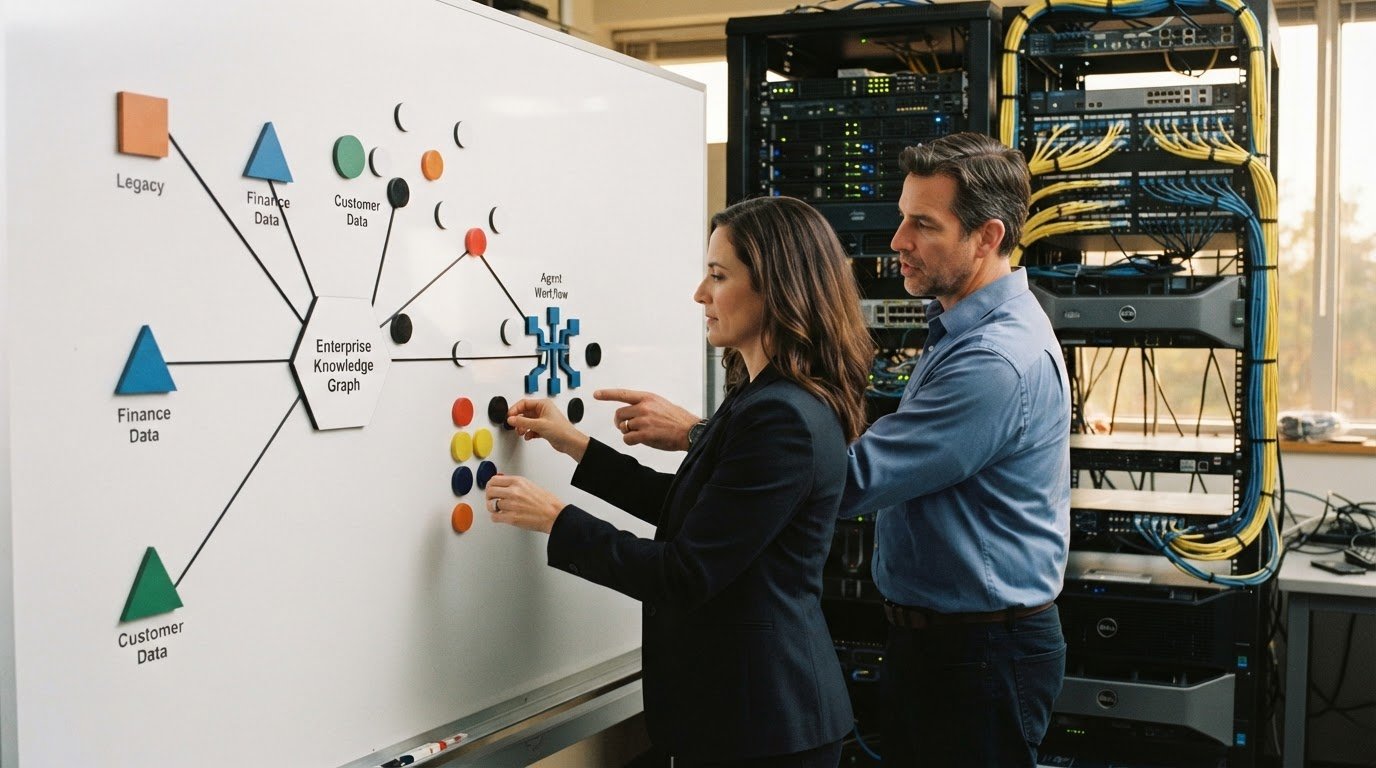
Syntes AI helps organizations bring complex data and systems into a structured, actionable view. This can support software TCO work when cost inputs, dependencies, and operational context span multiple enterprise platforms. Its Enterprise Knowledge Graph, Cross-System Integrations, and Context Engineering address how information connects across those environments. The Syntes Agentic Platform enables organizations to deploy and manage AI agents for operational tasks using enterprise context.
Turn to Syntes AI when fragmented systems make it difficult to understand how software fits into operations and purchasing decisions. The right approach depends on your data landscape, integration needs, and workflows. Contact Syntes AI to discuss your organization’s needs.
Turn Your TCO Analysis Into a Confident Decision
The value of knowing how to calculate total cost of ownership for software lies in the decision it supports: one grounded in operational priorities, not a single attractive figure. Before approval, align finance, IT, and business stakeholders on what the system must accomplish and which trade-offs matter most. Shared context turns a cost model into a practical decision framework.
Make the next step clear. Identify who owns the assumptions, how the purchase will be evaluated, and which operational outcomes would justify the investment. If disconnected enterprise data makes those decisions harder, Syntes AI can help structure complex information and systems.
Use the analysis to move forward with clear priorities and a shared understanding of the decision.
A disciplined purchasing process creates a stronger foundation for the work ahead.
Frequently Asked Questions
What is TCO and why is it important?
Total cost of ownership, or TCO, estimates the full expense of acquiring and using a system throughout its life cycle. It matters because the purchase price alone can hide costs that affect budgets and operational capacity. For example, a software option that appears affordable upfront may require extensive internal support. TCO gives decision-makers a broader basis for assessing whether expected benefits justify total spending.
What is included in TCO?
TCO includes the costs of acquiring, configuring, operating, maintaining, and retiring a system. For software, these may include license or subscription charges, implementation work, support, infrastructure, training, downtime, and eventual data migration. The relevant categories depend on the deployment model and business workflow. For example, an organization managing its own servers includes hardware operations, while a cloud deployment includes recurring service and storage charges.
How is TCO calculated?
Add the costs expected over the system’s evaluation period, separating initial expenses from recurring and indirect costs. Then subtract any end-of-life value, such as hardware resale or repurposing value. Calculate software TCO using consistent assumptions about users, usage, and system lifespan. For example, include training time even when it does not appear on a vendor invoice.
What costs should be included in software total cost of ownership?
Include costs before launch, during operation, and at retirement. Relevant items may include licenses, configuration, integrations, employee training, support, upgrades, hosting, storage, outages, and data migration. Account for internal labor and displaced work too. For example, if staff must maintain a connection between the software and another system, include that ongoing effort rather than counting only the integration project.
How do you calculate software TCO step by step?
Start by defining the system’s purpose, users, workflow, and expected lifespan. Next, list one-time, recurring, indirect, and retirement costs. Estimate each item using consistent assumptions across options, then total the costs for the selected period and subtract relevant end-of-life value. For example, separate setup work from annual support so future budgets show when each expense occurs.
What is the standard software TCO formula and time period?
A simplified formula is purchase price plus implementation costs plus operating costs over the selected period. A software estimate may use a 5 to 10 year horizon, but the appropriate period depends on the system’s expected lifespan and the organization’s plans. For example, software tied to a platform scheduled for replacement should not be evaluated as though it will remain in use indefinitely.
How do software licensing and subscription costs affect TCO?
Licenses and subscriptions can create recurring costs throughout the evaluation period. Their impact depends on the pricing basis, user count, required features, and renewal terms. Track licenses needed for current and planned users, and distinguish included support from separately charged services. For example, periodic license reviews can uncover unused seats or those no longer needed, creating an opportunity to reduce or reassign them.
How should implementation, migration, and integration costs be estimated?
Estimate each activity separately, based on the work required rather than a single broad implementation allowance. Identify consulting, configuration, customization, system connections, data preparation, transfer, and validation. Include employee hours and displaced work. For example, migrating records from a legacy platform may require mapping fields and resolving inconsistent data before import, while integration effort depends on the systems and workflows involved.