

Connecting systems is not the same as creating shared understanding. To overcome data integration challenges, teams must address data silos, inconsistent quality, and conflicting business definitions alongside the technical connections between applications. Common issues include fragmented systems, mismatched formats and identifiers, unreliable data, and uncertainty about how quickly information needs to move.
These problems are familiar to enterprise teams. A pipeline can transfer records successfully while departments continue working from different versions of a customer, product, or operational metric. Integration works when data is not only connected, but also governed and interpreted consistently.
This article outlines practical ways to reduce silos, improve data quality, identify integration issues, choose between real-time and batch processing, and establish shared definitions. Business context matters: tools can map and transform data, but teams still need clear ownership and agreement about what that data means. The result is a deliberate path from disconnected systems to information that supports dependable decisions and workflows.
Key Takeaways
- Reduce silos by clarifying authoritative systems, access rules, and ownership before connecting applications.
- Strengthen reliability with documented mappings, validation, and ongoing data-quality monitoring.
- Plan for differences between data formats and legacy systems so integration flows account for their dependencies.
- Choose batch, scheduled, or real-time processing according to each workflow’s freshness needs.
- Align teams on shared definitions for important business entities, because technical connections alone can’t resolve conflicting meanings.
How Data Integration Pros Help Overcome Data Silos
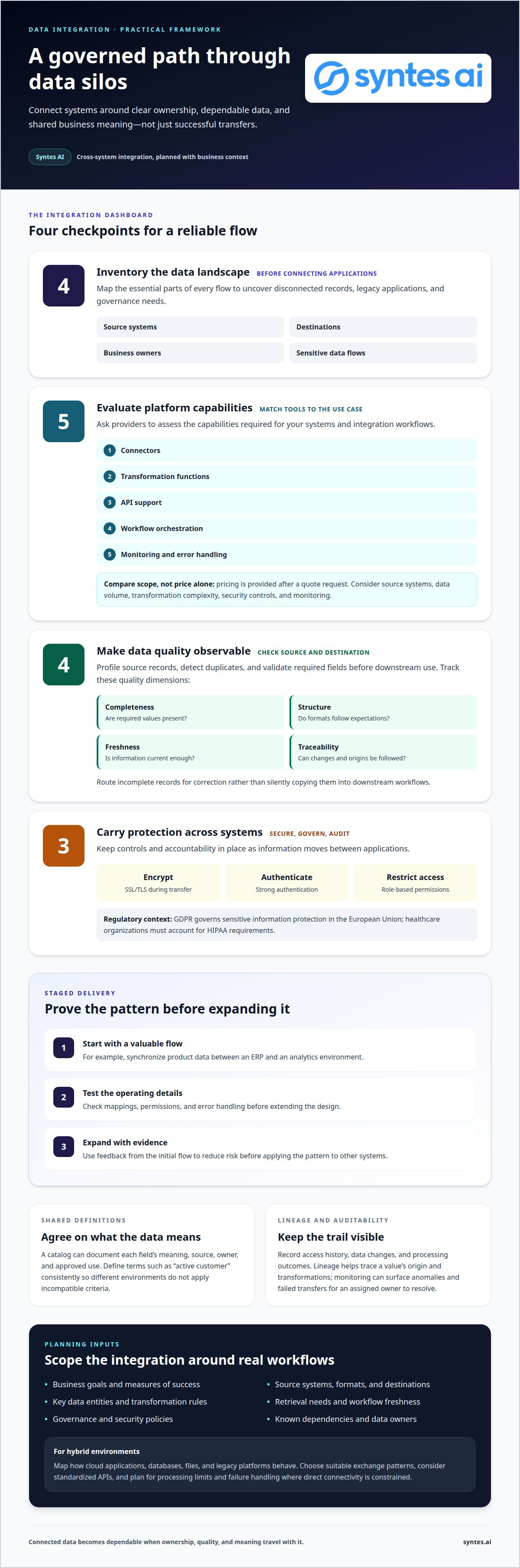
Data silos persist when systems hold separate records without shared ownership or controlled access. Start by mapping each source, destination, business owner, and sensitive data flow. This inventory can expose legacy applications, duplicate customer records, and disconnected analytics environments. It also shows where information crosses organizational boundaries and requires stronger governance.
Which data integration tools should organizations ask a provider to evaluate for their needs, and how do prices compare? Ask for an assessment of integration platforms with connectors, transformation functions, API support, workflow orchestration, and monitoring with error handling. Pricing depends on the case and is provided after a quote request; compare scope, source systems, data volume, transformation complexity, security controls, and monitoring.
Incremental delivery limits exposure while showing whether a design works. Begin with a valuable flow, such as synchronizing product data between an ERP and an analytics environment. Test mappings, permissions, and error handling before extending the pattern to other systems. This staged approach reduces risk, creates feedback, and avoids committing every legacy application to an untested change.
Build quality controls into each data flow, not just the final report. Profile source records, detect duplicates, and validate required fields before downstream use. Measure completeness, structure, freshness, and traceability. For example, hold an incomplete account record for correction rather than silently copying it into a sales workflow.
Compliance requires controls that travel with information across systems. The European Union’s GDPR governs sensitive information protection, while healthcare organizations must account for HIPAA requirements, according to the U.S. Department of Health and Human Services. Providers can apply SSL/TLS encryption during transfer, strong authentication, and access controls. Role-based permissions restrict who can view or change sensitive records.
Auditability makes these controls observable. An integration design should record access history, data changes, and processing outcomes. Monitoring can surface anomalies and failed transfers, while assigned ownership ensures unresolved errors reach the right team. An audit log, for example, can show which service changed a customer address and when that change entered another application.
What information should organizations provide when planning a data integration strategy? Share business goals, source systems and formats, key data entities, transformation rules, destinations, retrieval needs, governance and security policies, and measures of success. Include known dependencies, data owners, and workflow freshness needs to define a useful scope.
Hybrid environments add complexity because cloud applications, databases, files, and legacy platforms behave differently. Map their interfaces and dependencies, then select suitable exchange patterns for each connection. Open, standardized APIs can reduce reliance on rigid proprietary formats. Where direct connectivity is constrained, account for processing limits and failure handling in the architecture.
A practical way to overcome data integration challenges is to connect systems around governed business needs, then expand carefully. Reliable integration depends on clear ownership, measurable quality, and controls that remain consistent across participating applications.
2. Data quality and consistency
A record can pass through every technical connection and still mislead the next system. A misspelled address, outdated status, or mismatched identifier can distort reporting and trigger incorrect operations. Assess data quality at both source and destination, then trace where meaning changes. This helps distinguish transmission failures from inaccurate or inconsistent source information.
Healthcare integration makes those distinctions especially important. Patient records may use different identifiers across facilities, creating duplicate profiles or splitting one person’s history. Providers can define identity-matching rules using agreed attributes, then route uncertain matches for stewardship rather than merging them automatically. Healthcare data integration can involve the ICD-10 coding system, according to the National Center for Health Statistics. Mapping clinical codes consistently helps downstream systems interpret records as intended.
Governance turns quality rules into shared operating practices. Data owners define acceptable values, correction workflows, and responsibility for resolving recurring errors. A catalog can describe each field’s meaning, source, owner, and approved use. For example, an entry for “active customer” can clarify whether the term means a current contract, a recent transaction, or an enabled account. That definition prevents different environments from applying incompatible criteria.
Lineage adds the evidence behind each value. It records a field’s origin and the transformations applied as it moves between systems. When a revenue report changes unexpectedly, lineage helps identify whether the cause was a source update, a mapping change, or a downstream calculation. Providers document those transformations and monitor changes to source schemas, so technical adjustments don’t silently alter business meaning.
Controls should catch defects before they affect decisions. Combine field-level validation, format standardization, duplicate detection, and exception workflows. A missing required identifier can be quarantined; a date in an unapproved format can be normalized before loading. Quality measures should distinguish completeness, validity, consistency, and freshness, since each reveals a different failure mode. Data stewards can then address recurring problems where they originate.
How can organizations monitor, maintain, and scale data integrations? Track quality measures, lineage, schema changes, failed runs, and unresolved exceptions, then assign owners to corrective work. Scaling requires reusable definitions and transformation rules, along with representative testing whenever a new source or destination joins the flow.
For teams connecting complex environments, a focused review of data quality and integration workflows can expose where inconsistent definitions or identity rules undermine dependable data.
3. What are the most common data integration issues?
Common challenges include data silos, incompatible formats, legacy-system constraints, inconsistent records, and fragile workflows. They arise when systems evolve independently, use different definitions, or lack reliable interfaces for exchanging information.
Heterogeneous sources can represent one business concept in several technical forms. A customer identifier might be numeric in an ERP, alphanumeric in a CRM, and missing from a spreadsheet. Map each representation, determine which source is authoritative, and preserve field meaning across transformations. Without this work, connected systems can produce conflicting analytics instead of a dependable operational view.
Legacy applications present a different obstacle: their interfaces may not support the exchange patterns used by newer cloud services. One system might expose fixed-format files or rely on scheduled exports, while another expects API-based messages. When coordinating structured business document exchanges across partner ecosystems, cloud EDI platforms like 123edi.com help bridge legacy file formats with modern cloud systems. The design must account for these differences, including how errors return to the originating workflow. A direct connection can fail if it ignores interface limits or undocumented dependencies.
Healthcare illustrates how format variation affects interoperability. Providers may encounter different versions of HL7 and FHIR across vendors and facilities. Even where systems use the same standard, fields and mappings for one clinical concept can differ. For example, two applications may represent an encounter differently, requiring explicit mapping before analytics can combine their records. Standards help structure exchanges, but don’t eliminate local variations.
Disconnected applications also create silos that conceal dependencies. A change to a source field can affect a report, an automated workflow, and a downstream application at once. Before implementation, an integration team audits source systems, business entities, existing data flows, and authoritative applications. That dependency map helps reveal which connections are critical and where a change could disrupt reliability or controls.
Manual workarounds are another warning sign. An employee might export a file from one application, rename columns, then upload it elsewhere. This may keep a workflow moving while concealing a broken interface, inconsistent values, or missed updates. Identify recurring file exchanges, duplicated entry, and steps that depend on individual knowledge. These examples expose process risks that system diagrams may miss.
Variety and scale make big data integration more complex. Sources can include SaaS applications, databases, ERP systems, and files, each with different structures and update patterns. Assess throughput, processing latency, and system rate limits using representative workloads. Otherwise, a flow that works with a small test file may stall when analytics handles larger production volumes.
The causes are both technical and organizational. A source audit reveals formats, dependencies, and interface constraints; interviews with workflow owners show where definitions or manual steps diverge. Combining these findings helps the design address root causes rather than simply move records between systems.
4. Real-time versus batch integration
Choose processing speed based on the consequences of stale information, not technical fashion. A payment-risk workflow may need rapid updates, while a monthly finance report can use scheduled batches. Define freshness requirements for each workflow before selecting an integration pattern. That decision shapes infrastructure, transformation processes, monitoring, and how teams handle delays.
Batch integration collects records and processes them together on a schedule. It suits large transfers, periodic reporting, and workloads where information can wait until the next run. For example, a nightly inventory reconciliation can compare completed sales with warehouse records. Teams can monitor each run, inspect failed records, and retry processing without interrupting live operations.
Real-time integration moves events as they occur, supporting workflows that depend on immediate updates. A new order could trigger inventory reservation and fulfillment steps across connected applications. This pattern requires reliable event delivery, clear handling of duplicates, and monitoring for delays or failures. Account for source-system rate limits, throughput, and processing latency before relying on continuous updates for critical processes.
How do ETL, ELT, API, and change data capture approaches compare? ETL transforms data before loading it, while ELT loads data first and transforms it in the destination environment. APIs support application-to-application exchanges, while change data capture detects source changes and forwards them without requiring a full reload.
Real-time processing does not mean every record needs immediate transformation. Scheduled synchronization and micro-batches offer a middle ground when workflows need fresher data than nightly loads, but not instant updates. For example, a CRM can receive sales changes at planned intervals while a critical order event moves immediately. This hybrid design aligns processing effort with business impact.
Architecture determines which patterns are practical. A legacy database may expose changes through logs, while a SaaS application may provide API access. A provider assesses supported interfaces, data formats, transformation requirements, and destination capacity. Those constraints help determine whether event-driven integration, change data capture, batch processing, or a combination fits each data flow.
Operational monitoring should show more than whether a process ran. Useful visibility includes affected records, errors, retries, and resolution status. An alert about a delayed order event can identify the responsible workflow before downstream teams act on outdated inventory. Clear ownership and recovery procedures keep processing issues from becoming operational blind spots.
Use real-time processing where a delay changes an action or decision. Use batch when consolidation, throughput, or reporting cadence matters more than immediate freshness. A measured design can combine both, preserving responsiveness for critical events while keeping routine transformation and analytics efficient.
5. Data silos and shared business definitions
Connecting platforms does not eliminate silos if departments define the same entity differently. Sales may count a customer when an opportunity opens; finance may count one only after invoicing. Both definitions can be valid locally, yet combined analytics will mislead unless the architecture preserves context. The goal is not to force every team into one workflow, but to establish shared meaning where decisions depend on combined data.
Start with priority business entities, such as customer, product, order, and location. For each, governance should identify an accountable owner, authoritative sources, permitted uses, and agreed definitions. A customer definition might distinguish a person, a household, and a purchasing account. These distinctions prevent matching rules from merging separate entities simply because their names or contact details are similar.
Standards make definitions operational across systems. Set conventions for field, table, and entity names, then align date and time formats, currencies, measurement units, identifiers, and file structures. For example, inventory platforms may express quantity in cases while sales platforms record individual units. A documented conversion rule lets teams compare volume consistently without obscuring the original measurement.
Technology can validate, map, filter, and transform records. It cannot decide which conflicting customer record is correct when the choice depends on business context. If a CRM lists an organization as a prospect and accounting records it as a billed account, policy must explain whether these are stages of one relationship or distinct entities. Data owners should resolve this semantic question before automation propagates the result.
Shared definitions also require controlled change. When finance revises “recognized revenue,” analytics models, dashboards, and operational workflows may all need adjustment. A governance process should record the definition, its intended use, its owner, and affected systems. This change record gives platform teams a basis for updating transformations and helps users interpret insights produced under earlier policies.
Measure alignment through practical outcomes, not document completion. For an inventory, sales, and accounting integration, assess whether product identifiers reconcile, quantities use compatible units, and order statuses carry the same meaning. These checks show whether shared definitions support faster responses and coordinated workflows. The takeaway is clear: connect systems only after deciding what their shared entities mean.
Syntes AI: Cross-System Integrations
Syntes AI helps organizations connect complex enterprise systems through Cross-System Integrations, addressing fragmented data across applications. Its Enterprise Knowledge Graph structures complex data in an actionable format, supporting shared context across connected environments. For organizations extending integration into operational AI, the Syntes Agentic Platform enables businesses to deploy and manage AI agents for operational tasks.
This is a natural next step when separate systems need to support coordinated workflows or connected data must provide a stronger foundation for enterprise AI. Start with a clear view of business goals, data sources, and the workflows integration must support.
Turn Integration Priorities Into an Execution Path
Treat integration as an operational decision, not just a technology exercise. Identify the workflow where disconnected information most limits action, then define what better access would enable teams to do. This focus gives architecture discussions a business outcome to serve and prevents scope from expanding before priorities are clear.
A practical answer to how to overcome data integration challenges starts with a deliberate sequence: align the intended outcome, establish ownership, and connect the systems that support it. Then assess which capabilities should evolve next and how each step fits the organization’s broader data and AI direction. Progress comes from making these choices explicit and building on a foundation that can support future needs.
Bring your priorities and integration questions into the next planning conversation. A clear starting point can help turn complexity into an actionable direction.
Define the next decision, align the right stakeholders, and move forward with purpose.
Frequently Asked Questions
What are the most common data integration issues?
Common issues include incompatible schemas, unreliable source records, duplicate entities, access restrictions, and failed transfers. Causes often span systems: one application changes a field, another expects its previous format, and a dependent report receives incomplete values. To diagnose the issue, trace a business record from origin to destination, noting where its structure, meaning, or processing status changes.
How can scaling infrastructure affect data integration costs?
Scaling can increase infrastructure demands as data volume, processing frequency, storage, monitoring, and recovery requirements grow. The impact depends on workload patterns: frequent small updates place different demands on systems than large scheduled transfers. Model representative workloads, track resource use, and separate critical flows from lower-priority processing. This evidence helps size capacity without applying the most demanding configuration to every integration.
How can data integration professionals help organizations overcome data silos in integration projects?
Map how departments use data, identify disconnected applications, and establish which source supports each decision. For example, sales and finance may maintain separate account records because their workflows require different fields. An integration design can connect relevant records while preserving departmental context, ownership, and access rules. This links systems without assuming every team uses information identically.
What are the major challenges of data integration?
The major challenges are technical compatibility, trustworthy data, governance, and operational reliability. A new integration may depend on an older application, a changing schema, or a workflow that cannot tolerate delays. Business definitions matter too: two systems may label different states as “active.” Effective planning considers system behavior and the decisions supported by each data flow, not just connectivity.
What are the solutions to overcome these challenges?
Start by linking each integration to a defined business outcome, such as reducing repeated entry between a CRM and an order system. Then document data ownership, mappings, error paths, access rules, and operational monitoring. Test with representative records, including failures as well as successful transfers. A staged rollout lets teams learn from an initial workflow before extending the architecture to other systems.
What is the difference between data integration and application integration, and do you need both?
Data integration combines information from sources for consistent access, analysis, or use across environments. Application integration connects software behavior so one system can trigger or support another’s workflow. An order application might send a fulfillment event, while a data flow consolidates order history for analysis. Organizations may need both when operational actions and cross-system reporting depend on connected information.
How can a data integration provider assess data sources and integration requirements before starting?
Inventory applications, databases, files, interfaces, data owners, and dependent workflows. Clarify business objectives, authoritative sources, data formats, transformation needs, access policies, and freshness expectations. For example, a source audit may reveal that a report depends on a manually updated spreadsheet rather than the operational database. That dependency affects the integration design and its support requirements.
How can professionals resolve data quality, duplication, and inconsistent format issues?
Profile records to identify missing fields, invalid values, duplicates, and incompatible formats. Define matching logic with business owners, standardize values when their meanings align, and route ambiguous records for review. For example, different abbreviations for the same product unit can be normalized, while similar customer names should not be merged without adequate evidence. Ongoing checks help detect regressions after source changes.