

The right integration pattern determines whether data is copied, synchronized, queried in place, or delivered when an event occurs. Data integration patterns for enterprise use cases are standardized ways to move, transform, and consolidate data, selected to match the required freshness, scale, and relationships between systems. No single pattern fits every flow.
It’s easy to treat integration as a connection problem: link two systems and move the data. But as enterprise environments grow, the pattern behind each connection shapes consistency, latency, complexity, and how confidently teams can use the information.
This article explains the fundamentals, then compares synchronization, federation, aggregation, migration, broadcast, and event-driven approaches. You’ll learn what each pattern does and how to choose among them based on data volume, freshness needs, and the outcome the systems must support.
Key Takeaways
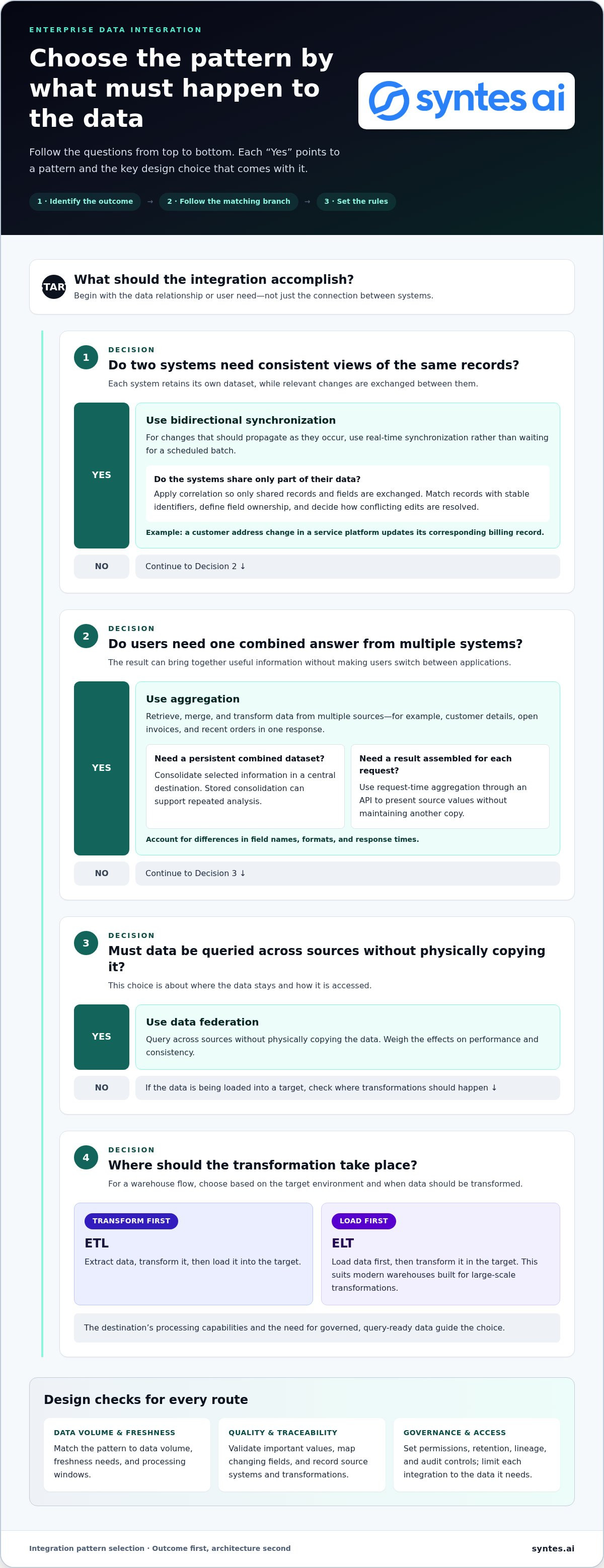
- Use bidirectional synchronization when two systems need consistent views, and correlation to limit updates to records both systems share.
- Choose aggregation when users or applications need a combined view from multiple sources without building another combined data store.
- Match the integration approach to data volume, freshness requirements, and processing windows; batch, broadcast, and event-driven patterns serve different needs.
- Use federation to query data across sources without physically copying it, while weighing the effects on performance and consistency.
- Understand the pattern’s role in the wider architecture, from direct connections and hubs to messaging and APIs, before scaling integrations across systems.
Bidirectional synchronization and correlation
Bidirectional synchronization keeps data aligned across two systems, each of which retains its own dataset. Correlation limits the exchange to records relevant to both, making matching and timing rules essential.
Real-Time Bidirectional Synchronization
Real-time bidirectional synchronization propagates relevant changes between two systems as they occur, rather than waiting for a scheduled batch. It’s useful when teams work with records in both applications and need each system to reflect current updates. For example, a support agent changes a customer address in a service platform, and the corresponding billing record updates. Define which system owns each field and how to resolve conflicting edits.
Synchronization Across Intersecting Datasets
Synchronization across intersecting datasets exchanges only the records and fields shared by two systems, leaving unrelated data in place. A sales platform and a service platform might both hold customer identity and contact details, while only the sales platform contains lead qualification fields. Limiting the exchange to shared data avoids unnecessary copying and clarifies which source supplies each value. Match records using stable identifiers, not names alone.
Data Correlation in Two-Way Integration
Correlation applies bidirectional synchronization only when each system has a record for the same person or item. A matching rule links the source record to its destination counterpart, then routes relevant changes between them. This prevents unrelated records from being treated as shared data. For example, sync a product catalog entry with an inventory record only when both represent the same product, not merely because their descriptions look alike.
Real-time synchronous integration is appropriate when a user or process needs current information before continuing. In a request-response exchange, the initiating system waits for the destination’s response. This supports immediate decisions but depends on both systems being reachable. Asynchronous exchange separates sending from processing, making it better suited to latency or temporary unavailability.
ETL extracts data, transforms it, then loads it into a target; ELT loads data first and transforms it there. ELT suits modern warehouses built for large-scale transformations, while ETL transforms data before loading.
In the United States, data governance, privacy, and compliance requirements depend on the data and the organizations handling it. Set access permissions, retention rules, lineage, and audit controls to meet applicable obligations, and limit each integration to the data it needs.
Data lakes, warehouses, and lakehouses influence where integration lands and where transformations run. ETL transforms data before loading; ELT uses the target environment for transformations. The destination’s processing capabilities and the need for governed, query-ready data guide the choice.
What is a data integration patttern?
A data integration pattern is a standardized method for moving, transforming, or consolidating information between systems. Aggregation uses this approach to combine useful data from multiple applications into a shared view.
Aggregation Across Multiple Systems
Aggregation retrieves, merges, and transforms data from multiple source systems to answer a request across applications. A customer-service application, billing platform, and order system can each contribute relevant fields to one customer response. This is useful when staff need a joined-up view without switching systems or waiting for separate reports.
An orchestration API can request a customer profile from one source system, open invoices from another, and recent orders from a third, then combine the results into one response for the calling application. A service bus can also mediate communication between applications, but aggregation logic must account for differences in field names, formats, and response times.
Data Consolidation Through Aggregation
Aggregation consolidates selected information into a usable result, either in a central destination or in a response assembled on request. For example, an operations dashboard might combine shipment status with inventory availability. This gives users a coherent view while preserving the source systems that own the underlying records.
Aggregation doesn’t always require a new combined data store. An API can retrieve, merge, and transform records from several sources for a single request. This distinction affects architecture: persistent consolidation supports repeated analysis of stored data, while request-time aggregation can present current source values without maintaining another copy.
Quality, Schema, and Master Data
Enterprises address data quality, schema changes, and master data by defining validation rules, mapping fields, and assigning ownership for shared entities. For example, an integration can reject an invalid customer identifier, map renamed source fields, and use an agreed customer record to resolve conflicting values.
Quality controls should match the action that uses the aggregated result. A finance workflow may require valid account codes before processing, while an operational view may flag incomplete details for follow-up. Record the source system and transformation applied so teams can trace a displayed value to its origin.
Schema changes need explicit handling because a source application can rename, add, or alter fields. Versioned mappings help an integration distinguish old and new formats, while compatibility rules prevent an unexpected change from silently corrupting results. Test representative records after updating a mapping.
Master data rules determine which system or stewardship process resolves identity and conflicts. If a CRM and billing platform contain different contact details, define field-level ownership rather than letting the latest update overwrite every value. This keeps aggregation useful across applications and makes exceptions visible to the teams responsible for the records.
Choosing patterns by volume, real-time support, scalability, and use case
Choose an integration pattern by balancing data volume, acceptable delay, and the work each system must perform. A turbine monitor and a nightly finance report need different flows.
Near-Real-Time Asynchronous Integration
Near-real-time asynchronous integration sends updates through messages or events without requiring an immediate response from the destination. It suits workflows that need current data but can tolerate processing after the initial exchange. For example, an order system can publish a status change while a warehouse application processes it independently. Queues hold messages during delays, helping decouple systems with different processing speeds.
Batch, Real-Time, and Streaming Approaches
Batch integration groups records for scheduled processing, while real-time integration responds when information is needed immediately. Batch suits cases where real-time data isn’t critical and the volume fits the available processing window. Change data capture and event-driven architecture support real-time integration by detecting record changes or events. A turbine-monitoring flow, for example, can broadcast temperature data every 100 milliseconds.
Streaming supports a continuous flow of events, allowing consumers to act as data arrives. A publish-subscribe model lets one producer send updates through a broker to several subscribers. If updates are needed at intervals shorter than approximately one hour, broadcast generally fits, subject to data-volume exceptions. Required freshness and consumers’ ability to process the stream shape the design.
Matching Patterns to Volume and Use Case
Match the workload’s volume, delay tolerance, and destination capabilities to the integration pattern. Migration is designed for large volumes and can process many records simultaneously, while a smaller recurring update may suit broadcast. A real-time workflow can use event queues, event streams, or publish-subscribe messaging. Each choice should account for retries, backlogs, and changing demand.
Use synchronous integration when a user or process needs current information before continuing. Choose asynchronous messaging when systems need looser coupling or must tolerate latency and temporary unavailability. Event-driven designs can decouple systems and support real-time workflows, but require careful event design and strong monitoring.
Choose iPaaS for managed integration workflows, an enterprise service bus (ESB) when centralized mediation and routing matter, and custom integration when specific requirements call for tailored control. ESB patterns include orchestration, mediation, aggregation, virtualization, and protocol bridging. Compare how each option handles endpoints, transformation, monitoring, and operational ownership.
To design and implement a strategy, identify the business outcome, classify data volume and freshness needs, map source and destination systems, then select and test a pattern. Define how to transform each format, monitor failures, and scale processing as demand changes. For example, a finance feed may run in batches while inventory events flow continuously.
These decisions become more consequential as integrations span applications and operational workflows. A focused integration architecture discussion can help connect pattern choices to the systems and use cases they must support.
Data federation and virtualisation
Data federation creates a unified view across sources without physically moving or copying their data. Data virtualization is one way to present that view, connecting users and applications to distributed information through a logical layer.
Consider querying customer details from a CRM, inventory from a warehouse system, and delivery status from a logistics platform. A federation layer can collect relevant records at query time and return a combined result. Each source remains responsible for its own data, while the consuming application works with a shared view.
Virtual tables make this view usable without copying every source record into a new repository. They present familiar table-like structures even when underlying systems store data differently. An orders virtual table might combine selected fields from a relational database and an application interface. Connectors translate requests between the federation layer and each source.
Connectors also determine how the architecture handles source-specific formats and capabilities. For example, a connector may translate a query into a database’s supported language, then return results in a consistent structure. Query pushdown can let a source filter or process data before returning results. This can reduce unnecessary transfer, depending on what the source can execute.
Data virtualization can improve access by applying transformations as queries run. A sales dashboard could join account details with current order status, then present both through one logical view. This helps when users need information across systems without relying on stale extracts. It doesn’t create a persistent, consolidated copy for repeated analysis.
Federation shifts some complexity into the access layer. A query that depends on several sources can slow down if one system responds slowly, returns a large result, or becomes unavailable. Understand which sources a view depends on, which fields are joined, and how it behaves when a source cannot respond. These dependencies affect application and report reliability.
Presentation-layer integration can also create maintenance complexity, interdependence between systems, performance effects, and data consistency concerns. If each application separately combines the same CRM and billing records, changes to either source may require updates across multiple interfaces. A shared virtualization layer centralizes those mappings but still needs clear ownership and monitoring.
Federation works best when the priority is a connected, queryable view across existing systems. A persistent warehouse or lake may be a better fit when teams need stored history, repeated large-scale analysis, or transformations that shouldn’t run at query time. Start with the use case, source capabilities, freshness needs, and operational foundation required to maintain access.
Enterprise integration pattern fundamentals
Integration patterns give distributed applications a repeatable structure for exchanging data and coordinating work. Gregor Hohpe and Bobby Woolf’s foundational book, Enterprise Integration Patterns: Designing, Building, and Deploying Messaging Solutions, was published in 2003.
Main Enterprise Data Integration Patterns
The main enterprise patterns include point-to-point connections, hub-and-spoke, publish-subscribe, message transformation, routing, and service orchestration. The Enterprise Integration Patterns language contains 65 patterns for designing distributed applications or integrating existing ones. Recognizing each pattern’s role helps teams select a structure that fits their systems, rather than treating every connection as a separate development problem.
Point-to-point integration connects two systems directly, making it suitable for a limited number of connections. As connections multiply, dependencies become harder to manage. A hub-and-spoke structure routes communication through a central hub, simplifying the addition of endpoints. An enterprise service bus can mediate applications and services through orchestration, virtualization, aggregation, and protocol bridging.
Migration is a distinct pattern that moves data from a source to a destination at a specific point in time. Filtering, transformation, copying, and integrity checks define the work. A customer-system replacement, for example, may migrate selected records once, while a separate pattern handles ongoing updates.
API-Led and Event-Driven Patterns
API-led connectivity uses APIs as the primary communication method between systems and data sources. An API gateway can centralize monitoring and support OAuth2, JWT authentication, rate limiting, and request sanitization. Those controls give teams a consistent way to expose and manage services across platforms, while API boundaries keep consuming applications separate from underlying implementation details.
Event-driven architecture triggers integration when data changes or another event occurs, rather than following a fixed schedule. Producers generate events, and consumers respond to them. In publish-subscribe, a producer sends updates to a central broker, which distributes them to subscribed systems. Event queues, streams, retries, and dead letter queues support asynchronous processing and fault tolerance.
Microservices organize software around business capabilities, with each service able to use its own database and deployment pipeline. Services commonly communicate through APIs or messaging. This supports independent scaling and faster iteration but increases testing and integration complexity. Strong monitoring and careful event design remain essential as event-driven workflows grow.
Enterprise integration platform pricing depends on the case and is given after a quote request; cost factors include endpoint count, data volume, transformation needs, deployment model, and operational scope.
The practical takeaway is to choose patterns by responsibility. Use direct connections for limited links, hubs to mediate endpoints, APIs for structured access, and events for change-driven coordination. Combining patterns is often appropriate: an API can serve an application while events distribute its updates.
Syntes AI: Enterprise Knowledge Graph
Syntes AI’s Enterprise Knowledge Graph structures complex enterprise data into an actionable format, giving teams a connected foundation for AI and operational use cases. Consider this approach when information is spread across systems and integrations alone don’t provide enough context to interpret relationships between records.
Cross-System Integrations connect capabilities across existing enterprise software, while Context Engineering shapes the information and context used by AI. For organizations moving from connected data to operational execution, the Syntes Agentic Platform enables businesses to deploy and manage AI agents for operational tasks. Together, these offerings address distinct layers: connecting systems, structuring knowledge, and applying it in workflows.
To discuss how these capabilities could support your integration priorities, contact Syntes AI or visit syntes.ai.
Turn Integration Decisions Into Operational Capability
The key is to treat integration as a foundation for decisions and action, not merely a way to move records. Choosing data integration patterns for enterprise operations means connecting architecture choices to the work people and systems need to perform. As workflows evolve, the meaning and relationships behind data matter as much as its movement.
Syntes AI brings that next layer into focus through its Enterprise Knowledge Graph, Cross-System Integrations, and Syntes Agentic Platform. Together, these offerings address connected enterprise data and its use in operational workflows. Start by identifying where fragmented information constrains decisions, automation, or coordination across systems.
Start with the decisions your organization needs to make, then shape the connected data foundation to support them. Your next integration choice can move the enterprise toward greater operational clarity.
Frequently Asked Questions
How can patterns help?
Patterns give teams reusable designs for recurring integration problems, reducing the need to invent connection logic for every application pair. For example, a shared message-routing pattern can direct order updates to the right consumers while maintaining consistent handling. This makes development decisions easier to review, clarifies system responsibilities, and helps teams anticipate failure points before adding another endpoint.
What makes integration difficult?
Integration is difficult because systems often describe similar business entities differently and change on separate schedules. A field called “account status” might mean billing eligibility in one application and sales activity in another. Teams must reconcile meanings, permissions, update ownership, and failure behavior. An exchange can work technically yet produce misleading results if definitions differ or a system processes an update twice.
When should enterprises use batch, streaming, or real-time integration?
Use batch when a process can wait for grouped updates, such as assembling records for a scheduled reconciliation. Choose streaming when consumers need a continuous sequence of changes and can process events independently. Use synchronous real-time integration when a user or process needs an immediate response before proceeding, such as validating an account before submitting a transaction. The key distinction is whether the consumer needs an immediate response, a steady event flow, or periodic results.
What are common enterprise data integration risks and how can they be mitigated?
Common risks include duplicate processing, missing events, unauthorized access, and transformations that alter meaning. Assign unique event identifiers and make consumers idempotent so retries don’t apply the same change twice. Use dead letter queues to isolate repeatedly failing messages, and monitor their resolution. Apply role-based permissions to sensitive fields, document transformations, and retain lineage so teams can trace unexpected results to their source.