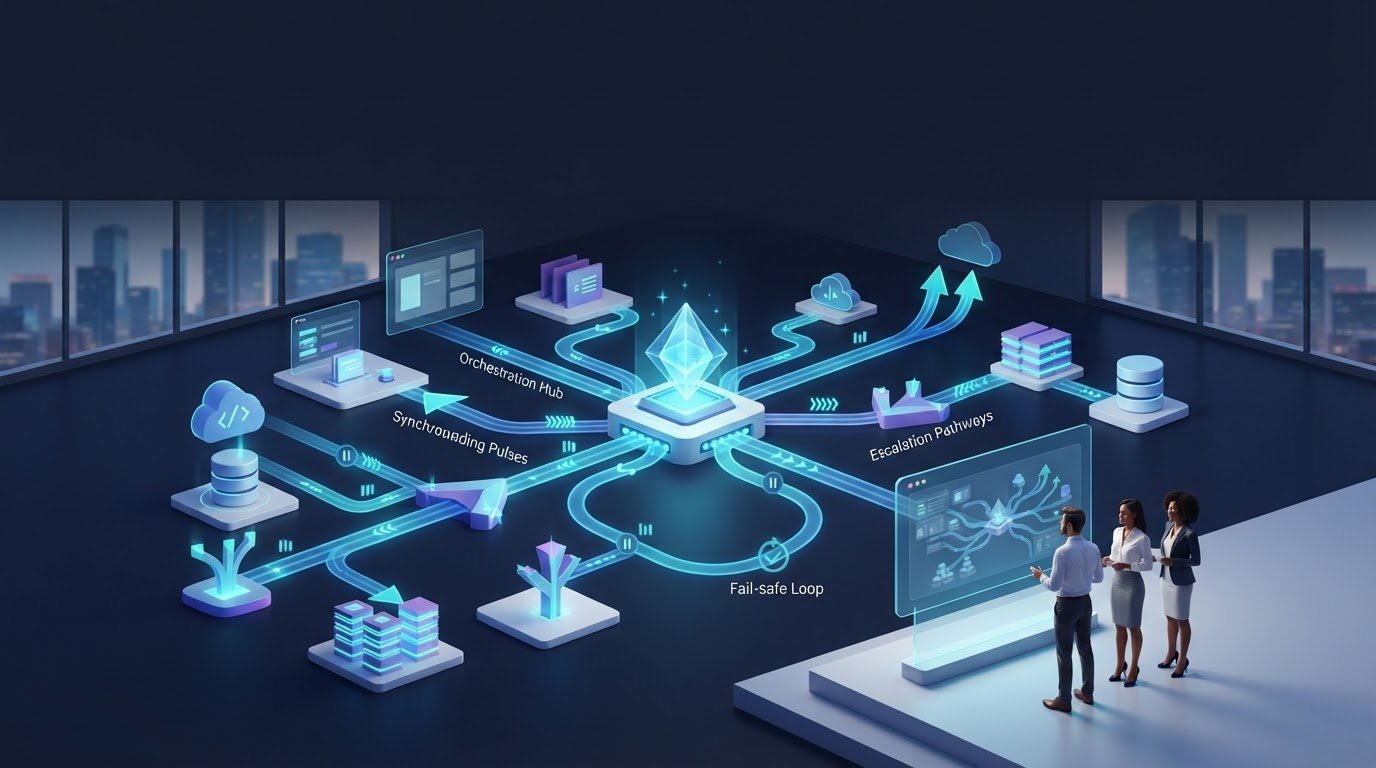
Disconnected apps alone do not create an automated operation; coordinated decisions do. Cross-system workflow automation connects applications so data, tasks, and decisions move between them according to defined rules. A clear workflow specifies what information moves, where it goes, who owns each step, and which systems are involved.
Connecting apps is not enough. Enrichment may finish after a routing rule runs, updates may arrive late, and exceptions can stall a workflow without a defined destination. Reliable coordination accounts for these gaps with wait conditions, escalation paths, and oversight built into the process.
This article explains how cross-system workflows connect enterprise applications, why synchronization delays matter, and how orchestration coordinates activity across a software stack. It also covers where agentic AI can support decisions, why governance must extend across the workflow chain, and what teams should review as systems and requirements change.
Key Takeaways
- Map the data, systems, ownership, and handoffs behind a workflow before automating it.
- Use completion signals, time limits, and fail-safe routes to manage delayed or missing updates.
- Connect event-driven actions to business rules, and refine workflows as systems and operational needs change.
- Centralize orchestration and logging so teams can trace actions across applications and diagnose failures.
- Use AI to coordinate decisions within governed boundaries, and explore Syntes AI when complex enterprise data and workflows need a shared operational context.
What Are Cross-System Workflows?
A cross-system workflow coordinates data and actions across applications. For example, a customer record might move from a CRM to an enrichment tool and then to a routing queue. The workflow defines the data, destination, step owners, and participating systems.
Data Synchronization Between Systems
Data synchronization keeps related records aligned as information moves between business systems. A CRM update, for example, can pass a customer’s industry to a sales platform so routing rules use the same value. Define which system owns each field and how updates affect other records. Without clear ownership, conflicting values can lead to inconsistent downstream decisions.
Before daily use, test routing, data movement, permissions, exceptions, and user experience. A field dependency map can show how a value connects across five different systems, helping teams assess downstream effects before changing or retiring that field.
Real-Time Data Synchronization
Real-time synchronization sends or triggers an update as an event occurs, rather than waiting for a scheduled batch. When a CRM record changes, an event can prompt another application to receive the relevant field and continue the workflow. This matters when a later action depends on current information, such as assigning a lead based on its industry.
“Real time” still depends on each system completing its own work. If an enrichment tool has not populated a location field when CRM routing runs, the lead may go to the wrong queue. Workflows therefore need a signal that confirms enrichment is complete, not just a record-created event.
Data Movement, Context, and Trust
Data movement carries values between applications; context explains what those values mean and how the workflow should use them. A shared field dictionary can record each field’s owner, usage, and last update, helping teams interpret values consistently across systems. This is especially important when the same field name means different things in separate applications.
Trust also depends on bounded access and traceability. NIST SP 800-53 Rev 5 identifies AC-6 as the Least Privilege control, IA-5 as the Authenticator Management control, and AU-2 as the Event Logging control. NIST CSF 2.0 identifies PR.AA-05 as its Identity Management, Authentication and Access Control reference. Limit each step’s access; rotate, scope, and revoke credentials.
Workflow Monitoring and Troubleshooting
Workflow monitoring tracks whether each action ran, what data it used, and where an exception occurred. To troubleshoot, follow the event record from trigger to destination, then compare expected and actual field values. Track completion, failure patterns, and response times to find where a workflow stalls or routes incorrectly.
Audit fields regularly, and maintain a shared dictionary with ownership, usage, and last-update details. Send errors to administrators, choose a primary notification channel, and reserve broad alerts for key updates. These controls reduce notification noise while preserving a useful trail for diagnosing failures and assessing workflow performance.
Managing sync delays with waiting logic
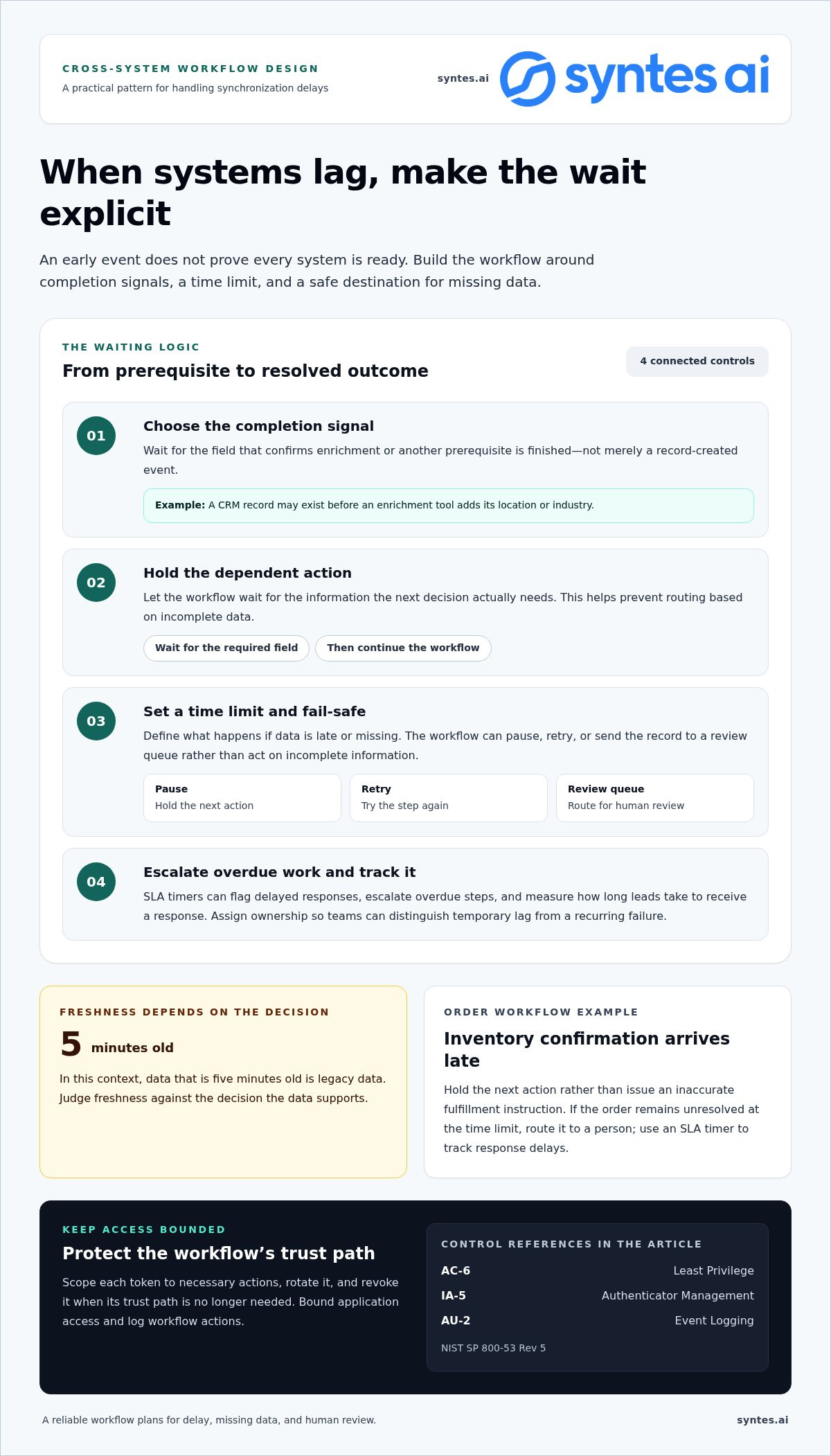
A workflow should wait for the data it needs, rather than treating an early event as proof that every system is ready. A signal field, time limit, and fail-safe route turn synchronization delays into managed outcomes.
Security and privacy controls should bound each application’s access, protect automation credentials, and log actions across the workflow. NIST SP 800-53 Rev 5 identifies AC-6 for Least Privilege, IA-5 for Authenticator Management, and AU-2 for Event Logging.
Common use cases include lead routing, order management, and procurement, where actions depend on updates across business systems. For example, an order workflow can wait for inventory status before triggering fulfillment or sending an exception for review.
Designing waits around completion signals
Choose a signal field that updates when enrichment or another prerequisite is complete. A CRM record’s creation time may arrive before an enrichment tool adds location or industry, so routing from the first event can send a lead to the wrong team. Wait for the field that confirms the required work is finished.
Set a time limit, then define a fail-safe route for missing or late data. The workflow might pause, retry, or send the record to a review queue rather than act on incomplete information. In this context, data that is five minutes old is legacy data, so judge freshness against the decision it supports.
Escalation, credentials, and cloud costs
SLA timers can flag delayed responses, escalate overdue steps, and measure how long leads take to receive a response. A timer makes a delay visible; an escalation rule assigns ownership. Teams can then distinguish a temporary synchronization lag from a recurring failure in the connecting application.
Credentials need the same deliberate lifecycle as workflow permissions. Scope each token to necessary actions, rotate it, and revoke it when its trust path is no longer needed. For cloud cost management, FinOps teams can relate workflow activity to cloud usage, identify repeated or unnecessary executions, and adjust triggers or processing choices. Cost control starts with understanding which workflow activity drives consumption.
Order management under changing conditions
Order workflows often depend on updates from sales, inventory, payment, and fulfillment systems. If inventory confirmation arrives late, waiting logic can hold the next action rather than issue an inaccurate fulfillment instruction. A time limit can route unresolved orders to a person, while an SLA timer tracks response delays.
This approach reduces manual chasing without assuming every system updates simultaneously. Review exception patterns and adjust the signal, wait condition, or owner when delays recur. Teams coordinating complex application handoffs can explore cross-system workflow design as a way to align those dependencies.
Flow integration and event-driven workflows
Event-driven workflows start actions when a business event occurs, then pass the result across connected platforms. Effective integrations begin with the process, not the connector.
Workflow Design and Implementation
Workflow design maps a business process, its data, systems, rules, and handoffs before integration begins. DataBank recommends defining these elements before building automation around them. This sequence exposes ownership gaps and conflicting rules before they become operational failures.
Then select the event that should trigger action, map the required fields, and define each destination. For example, a procurement request can trigger an availability check before approval routing. Test the resulting path, including permissions, exceptions, and user experience. The workflow should reflect how employees complete the process, not just how platforms exchange records.
Integration Failures and Risk Mitigation
Integration failures occur when data formats differ, events arrive out of sequence, or a system changes without updating connected workflows. Point-to-point integrations can make these dependencies difficult to manage because every connection has its own logic and maintenance needs.
Document interfaces, field mappings, owners, and error handling in a shared record. For legacy systems, preserve existing business rules while exposing only the data and actions newer platforms require. Custom API integrations can address specific gaps, but need clear versioning, authentication, and failure handling so an API change does not silently interrupt downstream processes.
Event-driven design connects a meaningful change to a defined action. A supplier status update, for instance, can trigger a procurement workflow without waiting for an employee to notice the change. A flow integration platform can reduce ongoing integration upkeep by roughly 35%. That makes centralized flow management useful where scattered point-to-point connections create repeated maintenance work.
Scaling depends on repeatable patterns, clear ownership, and regular review. Keep integration logic modular, record dependencies, and reassess workflows when systems, teams, volumes, or reporting needs change. This helps prevent a local adjustment from breaking an unrelated process. A procurement workflow can also connect Slack or Teams with availability records, allowing employees to check whether a tool is already available in less than one minute.
For each workflow, define the trigger, data contract, destination, exception path, and operational owner. Monitor changes to legacy platforms and custom APIs, then test affected integrations before release. These practices help maintain reliable automation as the enterprise application landscape evolves.
Event order matters: a lead may be routed incorrectly if CRM automation runs before an enrichment tool fills fields such as location or industry. Treat enrichment as a prerequisite to keep routing decisions grounded in complete records. Likewise, a supplier delay can trigger automated workflow actions before an employee finishes their morning coffee, turning a status change into a timely response instead of a missed handoff.
Some operations teams use interactive Slack messages to let representatives update a lead’s status without logging in to Salesforce. In a telehealth firm, automated data pipelines and related workflows were reported to save teams 25+ hours per week. Such examples reinforce the value of linking triggers to clear actions and making updates accessible within the tools employees already use.
Centralized orchestration layers and iPaaS
A centralized orchestration layer coordinates triggers, decisions, and actions across applications. API-based integration, iPaaS, and robotic process automation solve different connectivity problems, so the right approach depends on system access and workflow complexity.
Centralized Orchestration Layers
An orchestration layer manages a workflow’s sequence across systems, rather than leaving each application to coordinate independently. For example, a customer update can trigger validation, enrichment, and a downstream record update. One control layer makes dependencies visible and gives teams a consistent place to manage routing, exceptions, and execution status.
Traceability is essential. Log each cross-application action with enough detail to reconstruct the automation path, including its trigger, decisions, and outcomes. If a CRM update fails before reaching an ERP system, the record helps operators locate the break and determine which downstream actions remain incomplete.
Comparing Integration Approaches
API-based integration connects systems through defined interfaces, making it useful when an application exposes the required data and actions. An iPaaS coordinates connectors and workflow logic across applications. Robotic process automation, or RPA, imitates user actions through an interface, which can help when a system lacks a usable integration endpoint.
The distinction matters. An API can provide direct access to a function; iPaaS can coordinate multiple integrations; RPA can automate interface-based tasks. For example, a workflow might use an API to retrieve order status, iPaaS to coordinate approval, and RPA to enter a result into a legacy screen.
Centralization also clarifies how failures travel. A trigger may arrive twice, a destination may reject a field, or an interface change may disrupt an RPA action. Define handling for retries, rejected data, and human review. Keep each exception linked to the affected record so teams can distinguish a completed step from one awaiting action.
Choose the architecture by mapping the workflow’s systems, actions, and dependencies. Use direct APIs where systems expose suitable operations; use iPaaS where several applications need coordinated logic; consider RPA for interface-only tasks. A workflow may combine approaches, but each handoff needs an owner and a traceable result.
As platforms change, review connectors, API versions, and interface steps against the live process. A CRM field rename, for instance, can break a downstream mapping even when the trigger still fires. Central orchestration makes that dependency easier to inspect, test, and maintain across the complete workflow.
Agentic AI and autonomous workflow decisions
Agentic AI extends cross-system workflow automation beyond fixed rules by selecting actions based on context. A conventional rule might route every invoice above a set threshold for review. An agent can assess invoice details, supplier history, and policy context, then recommend a route. The key distinction is decision authority: the system can suggest, execute within defined boundaries, or defer to a person.
That capability can bridge fragmented operations when information and tasks sit across separate applications. An agent could gather relevant records, compare them with a defined business policy, and prepare an action for an employee. The workflow still needs explicit boundaries: which records the agent can access, which actions it can take, and what conditions require human approval.
Design decisions around risk, not novelty. Let an agent handle a routine, reversible task only when its inputs and permitted actions are clear. Require review when records conflict, evidence is incomplete, or an action has material consequences. For example, an agent could classify a support request and draft a response, while a staff member approves sensitive account changes.
Context shapes decision quality. A policy document alone may not explain how a customer record, service history, and current case relate. Connecting relevant records gives an agent a basis for interpreting the task, while workflow rules constrain what follows. Separate access by role and purpose, and preserve a record of the context used for each consequential action.
Governance must cover the whole workflow chain, not just the model. Review where trust is established, delegated, and revoked across applications, agents, credentials, and human approvals. For example, a workflow that reads a supplier record, evaluates policy, and submits an approval needs clear ownership at each transition. If the agent’s access changes, review downstream steps so outdated permissions do not remain a route to action.
Measure operational outcomes alongside decision quality. Track whether the agent chose an allowed action, whether a person overrode it, and which inputs informed the result. Use those records to refine prompts, business rules, and escalation paths. An agent that completes tasks quickly but repeatedly needs correction is not meaningfully autonomous. Keep human oversight and recovery paths visible as the system evolves.
Adopt autonomy deliberately: start with bounded decisions, make the evidence traceable, and expand authority only when governance can support it. This is how agentic AI becomes an accountable part of enterprise operations, rather than an opaque layer acting across business systems.
Implement automation decisions in measured phases, and widen that scope only after reviewing the implications for the complete chain. For cross-app automation, governance reviews should cover the whole workflow chain, including where trust is established, delegated, and revoked. Examine each handoff together rather than treating an agent’s permission in isolation; a change at one point can affect the authority assumed by later steps.
Syntes AI: Enterprise Knowledge Graph
Syntes AI helps organizations connect complex enterprise data and use it across workflows. Its Enterprise Knowledge Graph structures information so teams and AI systems can work with connected business context rather than isolated records. This is useful when decisions depend on data spread across applications and platforms.
Cross-System Integrations embed AI capabilities across existing enterprise software stacks, while Context Engineering shapes the context that supports operational decisions. For teams moving beyond fixed rules, the Syntes Agentic Platform enables businesses to deploy and manage AI agents for operational tasks. Together, these capabilities support a shift from disconnected handoffs toward coordinated execution.
If your workflows span complex systems and need connected context, visit syntes.ai to explore how Syntes AI can support your next step.
Turn Workflow Potential into Operational Progress
Decide where coordinated decisions can create the clearest operational value. Start with a workflow where fragmented information slows action, then define what better execution should enable for the people responsible for the outcome. This gives teams a practical basis for prioritizing cross-system workflow automation and shaping its role across the enterprise.
Syntes AI’s Enterprise Knowledge Graph structures complex data into an actionable format. Cross-System Integrations connect capabilities across existing enterprise software, while the Syntes Agentic Platform enables businesses to deploy and manage AI agents for operational tasks. Together, these offerings connect enterprise context with coordinated action.
Bring a workflow challenge or operational priority into the conversation, and explore how Syntes AI can support your next step.
Clearer connections can help your teams move from fragmented workflows toward more informed action.
Frequently Asked Questions
What is cross-system workflow automation?
Cross-system workflow automation coordinates a business process across separate software applications, so an event in one system can initiate relevant actions elsewhere. For example, an approved supplier onboarding record could trigger checks, create a vendor profile, and notify the responsible team. Unlike automation within one application, it must account for each system’s data structure, permissions, and role in the process.
Which platforms and tools support cross-system workflow automation?
It can connect enterprise platforms such as CRM, ERP, procurement, and collaboration systems through APIs, integration platforms, or interface-based automation. To assess a tool, check whether it can access the required records, preserve stable identifiers, and handle permissions across the applications involved. For example, supplier onboarding may require procurement and finance platforms to recognize the same vendor record before actions can proceed.
What does cross-system workflow automation cost in the United States?
The price depends on the case and is given after a quote request. Key cost factors include the number and complexity of connected systems, available integration methods, data condition, workflow decision logic, governance needs, and ongoing maintenance. A workflow linking a few well-documented applications differs from one requiring custom connections and complex approval paths. Define the operational scope and required outcomes to frame a useful estimate.