

Connecting systems is the easy part; making their data mean the same thing is the real work. To understand how to unify disparate data sources, bring information from different systems into a shared, usable view while aligning its formats, definitions, and quality. Integration makes records accessible, but it doesn’t automatically make records about the same customer, product, or process comparable.
If your organization works across cloud platforms, on-premises databases, partner feeds, and public data, you know that more connections don’t always mean clearer insight. The challenge is preserving data’s meaning, freshness, and appropriate access controls as it moves between systems or is queried across them.
This article explains what data unification involves and why it’s important to distinguish sources, systems, and data before choosing an approach. You’ll learn how extraction and virtualization affect access, how data quality and synchronization shape reliable analysis, and how privacy requirements influence what can be combined. The result is a practical framework for understanding where data differences arise and what it takes to turn disconnected records into a coherent foundation for decisions.
Key Takeaways
- Connecting systems makes information accessible; aligning definitions and records makes it comparable for analysis.
- Choose between moving data and querying it in place based on access needs, freshness, and system constraints.
- Set shared definitions, quality rules, and synchronization expectations to keep combined data dependable.
- Build privacy, security, and governance requirements into the design, especially when sensitive information is involved.
- Map source systems, formats, update rhythms, and business meanings before deciding how to bring data together.
What is Data Unification?
Data unification creates a coherent view across systems, formats, and business definitions. It makes information comparable for analysis, not merely accessible.
Unification, Integration, and Master Data Management
Integration connects or moves data; unification also aligns its meaning, while master data management maintains authoritative records for entities such as customers, products, and employees. These functions address different challenges. A connector can bring customer records together, but it won’t resolve conflicting definitions of “active.” Master data management can establish a trusted customer record; unification makes that record useful alongside operational data. To decide how to unify disparate data sources, start with the decisions your combined data must support.
Platforms and Prebuilt Connectors
Integration platforms connect sources, transform information into consistent formats, and deliver it to destinations such as business applications. Prebuilt connectors can reduce custom integration work when they support a source, but they don’t resolve differences in business logic. An organization using six cloud platforms alongside on-premises databases still needs to decide which systems provide authoritative fields and how updates should flow. The connector handles connectivity, not the organization’s data policy.
Transformations and Schema Integration
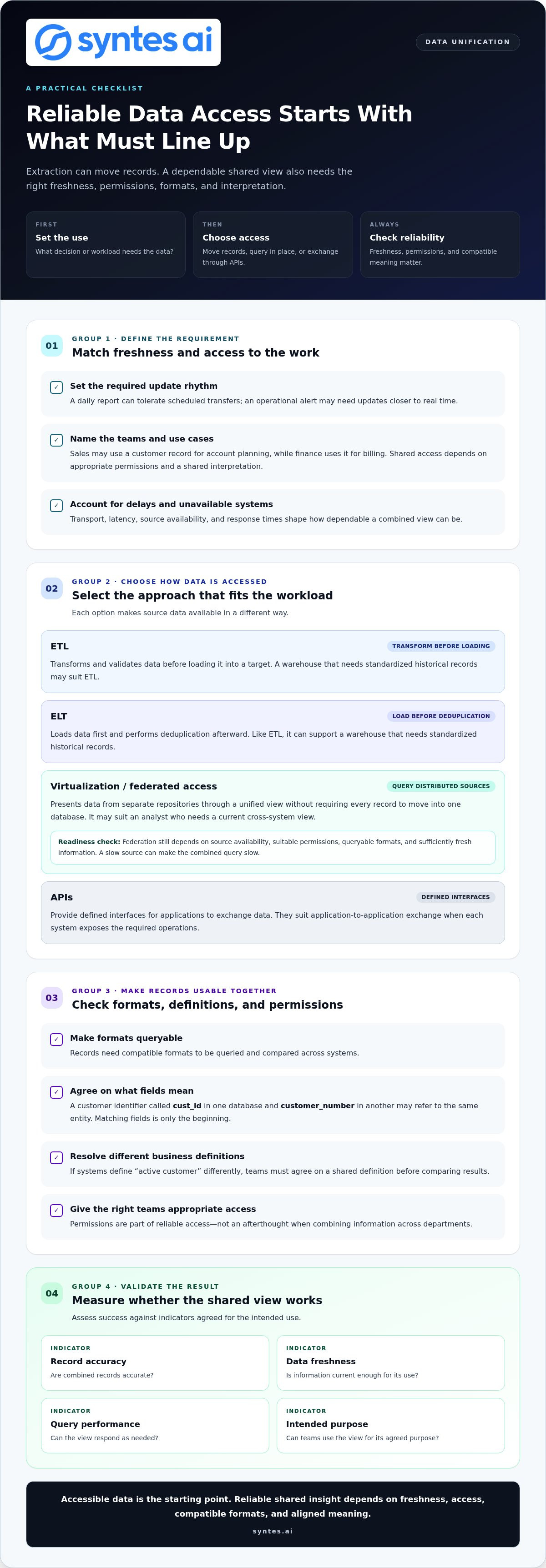
Schema integration maps fields and structures from separate systems into a shared model; transformations convert values to match that model. A customer identifier called cust_id in one database and customer_number in another may refer to the same entity. Matching fields is only the beginning. If systems define “active customer” differently, teams must agree on a shared definition before comparing results. That business decision shapes how to unify disparate data sources without treating different meanings as equivalent.
Unified Architecture and Implementation Planning
Build an implementation plan by identifying valuable sources and business processes, agreeing on definitions, then selecting an architecture and rollout sequence. Choose consolidated storage or a virtualized view based on access, freshness, and system constraints. To decide how to unify disparate data sources, prioritize datasets that support specific decisions rather than connecting every source at once.
Measure success against agreed indicators, such as record accuracy, data freshness, query performance, and whether teams can use the view for its intended purpose. Architecture also shapes integration costs, performance, and scalability. Moving every dataset can increase storage and processing demands; querying sources in place depends on their availability and response times. Middleware can connect legacy systems, but each transformation adds maintenance. At scale, unification may involve hundreds of thousands of datasets, making prioritization essential.
Can’t data be extracted from the different data sources in order to unify it?
Yes, but extraction alone doesn’t make data usable: transport, freshness, permissions, and compatible formats also matter. An enterprise can move data to one destination or query distributed databases through a shared access layer.
Transport, Latency, and Format Constraints
Reliable data access depends on transporting records, keeping them fresh enough for their intended use, granting the right teams access, and making formats queryable. A daily report can tolerate scheduled transfers; an operational alert may need updates closer to real time. These requirements shape which sources to connect and how to handle delays or unavailable systems.
Cross-department access also depends on permissions and shared interpretation. Sales may use a customer record for account planning, while finance uses it for billing. If either team receives stale data or an identifier in a different format, collaboration stalls. A data virtualization engine can expose catalogs and metadata so users can discover available data and understand its structure.
Federated Data Access
Federated access presents data from separate repositories through a unified view, without requiring every record to move into one database. In an Icehouse architecture, disparate systems provide unified access through a single consumption layer. This can help departments query distributed sources while data remains in its original environment.
This matters when teams need shared access but central copying would create unnecessary data movement. Zero-copy access queries data where it resides, and virtualization can join results dynamically or cache frequently used queries. However, federation still depends on source availability, suitable permissions, queryable formats, and sufficiently fresh information. If a source is slow, the combined query can be slow too.
ETL, ELT, Virtualization, and APIs
ETL, ELT, virtualization, and APIs are different ways to make source data available and usable. ETL transforms and validates data before loading it into a target; ELT loads data first and performs deduplication afterward. Virtualization queries distributed sources without requiring all data to be copied, while APIs provide defined interfaces for applications to exchange data.
Choose an approach based on the workload. A warehouse that needs standardized historical records may suit ETL or ELT; an analyst who needs a current cross-system view may benefit from virtualization. APIs suit application-to-application exchange when each system exposes the required operations. Extraction also requires engineering resources and can strain a warehouse, so account for transport and processing capacity in the design.
Approaches to Data Unification
The main approaches are centralized integration, federated access, or a hybrid that combines both. Centralized pipelines collect selected data in a lake, warehouse, or platform. Federation leaves data in source databases and presents a common access layer. A hybrid can collect frequently accessed data while leaving rarely used information at its source.
Start by mapping which departments need which sources, then match the architecture to freshness and access needs. This matters across the enterprise: 82% of enterprises report that data silos disrupt critical workflows. To assess how cross-system data access could fit a distributed environment, connect the architecture discussion to the workflows teams need to support.
Data quality and real-time synchronization
Connected data is dependable only when records remain accurate, consistent, and current. Profiling, shared quality rules, and synchronization controls help teams turn discrepancies into informed action.
Profiling and Managing Data Quality
Data profiling examines fields and records to reveal missing values, duplicates, inconsistent formats, and unexpected categories. It matters because quality problems can remain hidden until a report or model produces a misleading result. For example, a customer_status field may contain 20 values even though the business uses only 5 official categories. Profiling exposes that mismatch before it spreads through connected systems.
Make quality management an ongoing control, not a one-time cleanup. Define validation rules for required fields, permitted values, and acceptable formats, then profile data regularly to detect drift. Assign an owner to each shared data dimension to maintain approved values as business needs change. These controls help teams identify whether a defect originates in a source system, a transformation, or a synchronization process.
Consistency Across Data Sources
Consistency means applying the same definitions and permitted values across systems describing the same business entities. Shared dimensions should draw from common lists, preventing one platform from storing “California” while another uses “CA” for the same state. A named owner can approve additions and resolve disagreements, keeping the common definition aligned with operational needs.
Synchronization determines how quickly changes become visible across connected sources. Batch updates suit information that can wait for a scheduled refresh; event-driven updates suit workflows that depend on recent changes. Set a freshness expectation for each use case and monitor whether transfers meet it. Otherwise, a unified view can combine technically valid records that reflect different points in time.
Matching and Deduplicating Records
Match records by comparing shared identifiers first, then use agreed attributes to handle missing or conflicting identifiers. A shared identifier for each entity can resolve many combination failures, especially when systems use different names for the same customer. Apply deduplication rules to determine which record becomes authoritative and how to retain distinct, useful details.
So, how do you match and deduplicate records across data sources? Standardize key fields, match on a shared identifier where available, and apply documented rules to resolve remaining conflicts. A life sciences company deduplicated over 10 million contact records and improved record completeness by nearly 10%, showing why matching and completeness should be measured together.
Quality also sets the ceiling for AI performance: inaccurate or incomplete source data undermines predictions. Data scientists spend 60% to 80% of their time cleaning and preparing data, while 56% of technical leaders report wasting resources training AI on bad data. Validate and profile datasets before training, then monitor input quality as source systems change.
Privacy, security, and regulatory compliance
Combining sensitive records expands what analytics can reveal and what governance must control. Design privacy, permissions, and security into each data flow, from extraction through warehouse access and reporting.
Privacy and Regulatory Compliance
Privacy controls define which data can be combined, for what purpose, and which users can access the result. Organizations integrating sensitive data may need to account for GDPR requirements, according to the European Union, and HIPAA requirements, according to the U.S. Department of Health and Human Services. Data governance should also address GDPR and CCPA, sensitive-data handling, consent management, and user requests.
Start by classifying fields before integration. For example, a customer dataset may include contact details alongside purchase history; analytics users may need purchase patterns without direct identifiers. Remove personally identifiable information when it isn’t needed for the analysis, and apply permissions that match each role. This reduces unnecessary exposure while preserving the fields required for a defined business purpose.
Privacy-preserving techniques support different analysis needs. Secure multi-party computation lets parties calculate results from individual inputs without revealing those inputs to one another. Federated learning trains or analyzes models across decentralized datasets, while differential privacy adds randomized noise to aggregate results to limit reconstruction of original inputs. These methods address distinct risks, so their suitability depends on the computation and data involved.
Security Controls and Governance
Security governance assigns responsibility for access, data handling, and controls across connected repositories. Metadata catalogs can record what a dataset contains, where it originates, and how it may be used. This context helps a data steward distinguish a restricted source from a report-ready view before granting access or embedding analytics in a corporate portal.
Apply controls throughout the data path, not only inside the warehouse. End-to-end encryption can protect information during transfer and processing; access policies can limit which users or services retrieve sensitive fields. A secure enclave, also called a trusted execution environment, isolates code and data during processing. Homomorphic encryption supports analysis on encrypted data without decrypting it, while zero-knowledge proofs allow one party to prove a statement without revealing additional information.
Choose controls according to the operation. A cross-organization calculation may call for secure multi-party computation; an aggregate report may use differential privacy; protected processing may use an enclave. Document the selected control, data purpose, permitted users, and review process in governance metadata. Critical reports can also undergo governance review and receive certification before regular distribution or publication on an internal portal.
Distinguishing disparate systems, sources, and data
An organization may have 20 or 200 distributed data sources, but the count alone doesn’t reveal the real challenge. Separate the systems that store information, the sources that supply it, and the data differences that affect whether teams can combine records accurately.
Systems are the platforms, databases, and applications where information is stored or processed. Sources are the origins of that information, such as an internal sales platform, a partner feed, or public data. Data describes the records themselves, including their formats, schemas, update cadence, and business definitions. One customer record may travel through several systems while retaining one source and changing format along the way.
This distinction matters because each mismatch needs a different response. A system difference may call for a connector; a format difference may need a transformation; a definition difference requires agreement between teams. Definition conflicts can be hardest to resolve because technology cannot decide what a business term should mean. For example, one team might define an active customer by a 90-day purchase window, while another uses a 365-day threshold. Combining both without resolving the rule produces an inaccurate comparison.
Data silos can form when departments use separate software, operate in different locations, or rely on their own records because enterprise information is difficult to access or trust. A Fortune 500 life sciences company had customer data fragmented across more than 15 operating companies. In situations like this, the first task is not to connect every database. Identify which sources, data types, and business processes will benefit from integration, then determine who owns each definition and how teams will use the unified view.
Map each source across five dimensions: system, origin, format, update cadence, and meaning. Then classify each mismatch. A field-name mismatch points to schema mapping; an update mismatch points to synchronization rules; conflicting definitions call for a shared business decision. This sequence helps teams prioritize work and avoid treating every difference as a technical defect.
Disparate systems aren’t necessarily a problem. An organization can operate multiple platforms effectively when data remains accessible, comparable, and fit for its intended use. Risk arises when teams combine records without understanding what each source represents. Start with the decision the analysis must support, trace its required data to the originating sources, and document the definitions that make the result accurate.
Syntes AI: Enterprise Knowledge Graph
Syntes AI’s Enterprise Knowledge Graph structures complex organizational data into an actionable format. It’s a natural next step when connected systems still leave teams without a coherent view of entities, relationships, and operational context.
Cross-System Integrations connect AI capabilities across existing enterprise software, while Context Engineering helps shape the context those systems and AI workflows use. For organizations moving from unified data toward operational execution, the Syntes Agentic Platform supports deploying and managing AI agents for operational tasks. These offerings address distinct layers: structuring information, connecting systems, and enabling AI-supported workflows.
If your organization is ready to explore how these capabilities could fit its data environment, contact Syntes AI or visit syntes.ai.
Turn data alignment into operational progress
The next step isn’t to connect everything at once. Choose a business decision that depends on information scattered across systems, then define what a useful, trusted view must contain. That focus turns how to unify disparate data sources from an architecture question into a clear operational priority.
From there, identify the data relationships and system connections needed to support that decision. Syntes AI’s Enterprise Knowledge Graph can structure complex organizational data; Cross-System Integrations connect capabilities across existing software, while the Syntes Agentic Platform supports AI agents for operational tasks. The right starting point is the workflow where better context can help teams move from analysis to action.
Bring that priority into a conversation with Syntes AI and explore a practical next step for your organization.
Build with purpose, and turn connected information into a stronger foundation for decisions.
Frequently Asked Questions
What is disparate data?
Disparate data is information held in separate systems or collected from sources that don’t share consistent structures or meanings. For example, a CRM may store a customer’s account name while a billing system records a legal business name. Those entries may describe the same organization, but teams need reliable matching rules before treating them as one record. Differences can also involve formats, update timing, or field definitions.
What are the four main types of data sources?
The four main types are internal systems, third-party platforms, public data, and partner data. An internal source might be an organization’s CRM; a third-party platform could hold campaign activity. Public datasets provide externally available information, while partner feeds bring information from business collaborators. Classifying sources this way helps teams identify ownership, access requirements, and where definitions or update schedules may need alignment.
What is an example of a disparate system?
A CRM and an ERP system are disparate systems when they store related customer information using different structures. The CRM might identify an account by its sales record, while the ERP links orders to a billing identifier. Before combining those records, establish how the identifiers relate and which system owns each field. This helps prevent a report from counting one organization as two customers.
What does data unification mean, and how is it different from data integration?
Data unification makes information from different sources usable together under consistent relationships and definitions. Data integration connects or moves the information, but that connection alone doesn’t resolve conflicting meanings. For example, an integrated sales and service dataset still needs a shared rule for identifying a customer account. The distinction matters because teams may have accessible data and still lack a dependable basis for comparing results.
How do you assess data sources, formats, quality, and ownership before integration?
Assess each source against the decision it must support. Record its owner, business purpose, key fields, update pattern, access conditions, and known quality issues. Then inspect representative records for missing values, duplicate identifiers, and incompatible date or currency formats. For example, compare sample order records from the sales and billing systems. This inventory shows which sources are ready to connect and which need definitions or cleanup first.
How do you map schemas and resolve inconsistent data definitions?
Build a field map pairing each source field with its intended destination and transformation. Include the data type, permitted values, and business meaning, not just similar field names. If two departments define a term differently, document both interpretations and assign a business owner to approve a shared rule. Test that rule against representative records before applying it broadly, then retain exceptions that carry legitimate business meaning.
How do you choose a data integration or master data management platform?
Choose based on the architecture and workload the organization needs to support. Evaluate flexibility, scalability, ease of use, prebuilt connectors, and data-profiling capabilities. For example, a team joining cloud applications with on-premises databases may need hybrid connectivity, while customer master records require entity matching and stewardship controls. Compare how each platform handles transformations, monitoring, permissions, and changes to source schemas as systems evolve.
How do you maintain data quality, lineage, governance, and access controls?
Maintain these controls throughout the data lifecycle. Apply validation rules at ingestion, profile datasets regularly, and record lineage so users can trace a reported field back to its source and transformations. Assign owners for shared definitions, review access by role, and log changes to critical datasets. For example, a finance report should show its source tables, transformation logic, and authorized audience before recurring distribution.