

A disconnected system creates more than a data problem: it disrupts workflows. Disparate data is often called siloed data because it sits apart from other sources. Disparate systems are separate tools and platforms that do not reliably communicate. Understanding how to connect disparate data systems means addressing both how platforms exchange information and how that information is defined and used.
The friction is easy to see: customer, sales, inventory, and financial records may live in different systems, forcing employees to switch tools or enter information more than once. This can slow work, create inconsistent records, and leave people making decisions without the full picture.
This article explains how fragmentation affects employees and customers, and why integration involves more than moving data into one place. You’ll learn how APIs enable systems to exchange information, how workflow automation can reduce manual handoffs, and why shared definitions, governance, and monitoring help integrations stay useful as operations evolve.
Key Takeaways
- Recognize that connecting systems means more than moving data: it must arrive reliably, in a useful format, and at the right time for the people and processes that need it.
- See how a centralized ERP approach can coordinate data flows, while shared identifiers and definitions help make records comparable across systems.
- Trace how fragmented information can obscure trends and opportunities, then identify the business processes where better data access would sharpen decisions.
- Learn how API management and workflow automation can turn system connections into dependable operations, and where an Enterprise Knowledge Graph can bring structure to complex enterprise data.
What is another term for disparate data?
Disparate data, often called siloed data, is information stored separately from other sources. Disparate systems are separate applications or databases that may not communicate. For example, customer records in CRM software and invoices in finance software may be held apart.
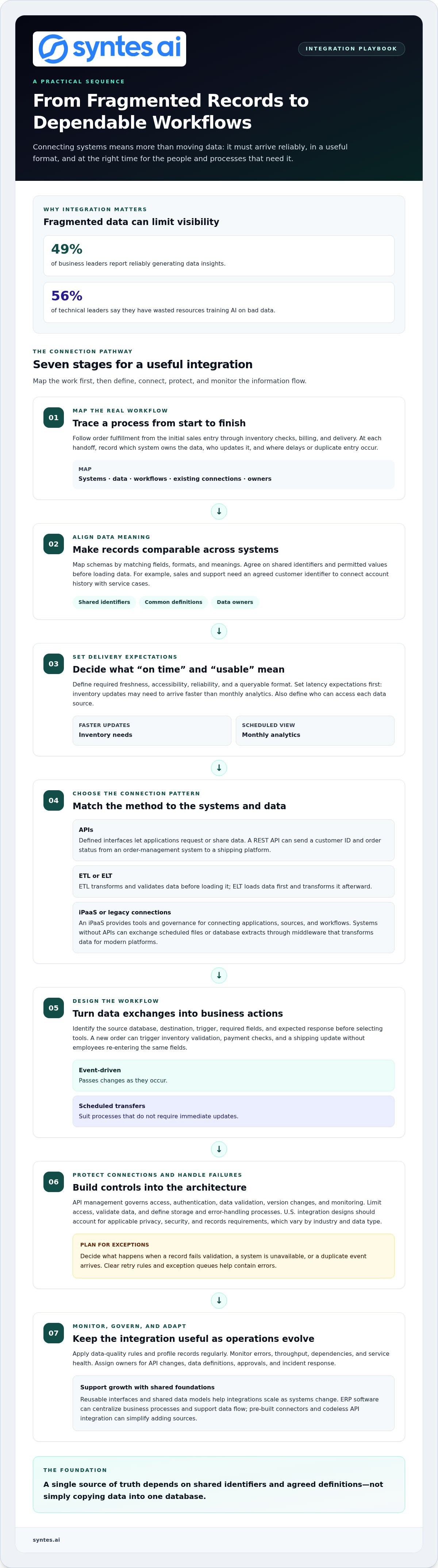
Effective integration must move data reliably, deliver it at the required freshness, make it accessible, and store it in a queryable format. Set latency expectations first: inventory updates may need to arrive faster than monthly analytics. Then define who can access each data source.
APIs let applications exchange data through defined interfaces. ETL transforms and validates data before loading it; ELT loads data first and transforms it afterward. An iPaaS provides tools and governance for connecting applications, data sources, and workflows.
U.S. integration designs should account for applicable privacy, security, and records requirements, which vary by industry and data type. Limit access, validate data, define storage and error-handling processes, and build monitoring into the architecture to manage exposure risks.
Integration costs depend on the number of sources, data complexity, latency requirements, and implementation scope; pricing is set after a quote request. Begin planning by documenting systems, data, workflows, and existing connections. Then prioritize use cases with clear ownership and measurable value.
Legacy systems without APIs can exchange scheduled files or database extracts through middleware that transforms data for modern platforms. Map schemas by matching fields, formats, and meanings. Agree on shared identifiers and permitted values before loading data to reduce later rework.
Apply data-quality rules, profile records regularly, and monitor errors, throughput, dependencies, and service health. ERP software can centralize business processes and support data flow, while pre-built connectors and codeless API integration can simplify adding sources. Reusable interfaces and shared data models help integrations scale as systems change.
Business and customer impacts of fragmented data
When customer, sales, inventory, and finance records are stored separately, employees may see conflicting versions of the same business event. A service representative might promise an item that inventory records show as unavailable. Customers may face delays, repeated questions, and inconsistent updates, while teams spend time reconciling records instead of resolving requests.
Fragmentation also weakens business visibility. Separate systems make it harder to consolidate reports, compare performance, or identify patterns across departments. Only 49% of business leaders report reliably generating data insights, while 56% of technical leaders say they have wasted resources training AI on bad data. Unconnected or inconsistent inputs can obscure demand shifts and leave growth opportunities undiscovered.
Business-process mapping reveals where gaps affect decisions. Trace a process such as order fulfillment from the initial sales entry through inventory checks, billing, and delivery. At each handoff, record which system owns the data, who updates it, and where delays or duplicate entry occur. This helps identify which integration work could improve collaboration and reporting first.
A shared source of truth requires more than combining records. Define common identifiers and business terms, assign owners for shared data, and establish governance for access and quality. For example, sales and support teams need an agreed customer identifier to reliably connect account history with service cases. Without shared definitions, even a consolidated dashboard can show misleading comparisons.
Prioritize a process with a visible business outcome, such as fewer manual order updates or clearer delivery reporting. Map its data sources, decision points, and owners before changing workflows. If leadership needs to align teams around an integration priority, discuss the use case and its data dependencies.
API management and workflow automation
An API defines how one application requests or shares data with another. For example, an order-management system can send a customer ID and order status to a shipping platform through a REST API. API management governs access, authentication, data validation, version changes, and monitoring so each connection follows consistent controls.
Workflow automation turns data exchanges into business actions. A new order can trigger inventory validation, payment checks, and a shipping update without employees re-entering the same fields. Event-driven patterns pass changes as they occur; scheduled transfers suit processes that do not require immediate updates.
A practical approach to how to connect disparate data systems is to design the workflow before selecting integration tools. Identify the source database, destination, trigger, required fields, and expected response. Then define what should happen if a record fails validation, a system is unavailable, or a duplicate event arrives. Clear retry rules and exception queues help contain errors.
- Use reusable APIs and shared data models to support multiple enterprise workflows.
- Apply common authentication and access rules to protect each connection.
- Track failures, throughput, dependencies, and service health as systems change.
For teams assessing how to connect disparate data systems, a single source of truth depends on shared identifiers and agreed definitions, not simply copying data into one database. Assign owners for API changes, data definitions, approvals, and incident response. These controls help integrated workflows deliver timely inputs for analytics and operational decisions while adapting as capabilities grow.
Syntes AI: Enterprise Knowledge Graph
Syntes AI’s Enterprise Knowledge Graph structures complex enterprise data for use across connected systems. It can be a useful next step when APIs and workflow automation move information, but teams still need connected context to interpret it.
Cross-System Integrations connect capabilities across existing enterprise software, while Context Engineering shapes data and context for operational use. The Syntes Agentic Platform supports deploying and managing AI agents for operational tasks.
To explore how these capabilities could support your integration priorities, contact Syntes AI.
Make Integration a Durable Capability
Treat system connectivity as an operating capability, not a one-time technical project. As priorities and workflows evolve, integration decisions need clear ownership and regular review. A useful next step in how to connect disparate data systems is to choose a business process, define the decision it should improve, and assign responsibility for maintaining its connections.
Syntes AI’s Enterprise Knowledge Graph structures complex data for enterprise use. Cross-System Integrations connect capabilities across existing software, while the Syntes Agentic Platform supports deploying and managing AI agents for operational tasks. These offerings are relevant when disconnected information limits how an organization can use its data across workflows.
Start with the operational outcome you want to enable, then align the data architecture and integration work around it. This focus turns connectivity into a foundation for informed action.
Build with intention and give your systems a clearer path forward.
Frequently Asked Questions
What is an example of a disparate system?
A timekeeping application that does not exchange information with payroll is one example of disconnected systems. Employees may record hours in one tool while payroll staff re-enter them elsewhere, creating opportunities for mismatches. A connection can transfer approved timesheets, but teams still need clear rules for corrections, overtime categories, and employee identifiers so both systems interpret each record consistently.
What are Data Silos?
Data silos are separate collections of organizational information that are not readily available across teams or systems. For example, a product team might track feature feedback in a spreadsheet while customer support records issues in a ticketing tool. Mapping who owns each source and which decisions depend on it helps show where shared access or coordinated definitions could improve work.
What are the four main types of data sources?
The four broad types are internal systems, third-party platforms, public data, and partner data. Internal sources might include a company’s finance database; third-party platforms could include an external payment service. Public sources include openly available datasets, while partner data may come from a distributor or supplier. Classifying sources this way helps teams identify ownership, access needs, and intended use.